Human-Centred IoT Design · Study deck
IoT Interaction Principles: State and Evidence
A smart lock must show whether a tap was sent, accepted, or acted on.
UX Uma is your guide for this deck.
After studying this chapter
Learning objectives
You will be able to:
- explain core interactive design principles for IoT products
- connect each principle to reviewable evidence from users, context, prototypes, logs, and support scenarios
- identify weak interactions where state, feedback, control, recovery, or trust is hidden
- review IoT setup, notification, and device-control interactions without relying on unsupported claims
Major section
Show the Lock State Clearly
The design must show what the system is doing and what the person can do next.
- After the tap, the lock interface should show whether the command was accepted, is still pending, or changed the door state.
- A polished confirmation can still describe an old or inferred state.
- The user may be tired.
Major section
Show the Lock State Clearly (continued)
The room may be loud or dark.
- The person needs a timely, accessible way to retry, cancel, seek help, or use a safe manual path when the device is offline.
- If the command is queued or the device is offline, say so plainly and offer the tested manual or support path.
- An undo path limits harm.
Major section
Show the Lock State Clearly (continued)
A sound design still has to work on a bad day.
- A device may be low on power.
- A link may come and go.
- Two records may reach the screen in the wrong order.
- The first view should show what happened, when it happened, and what is known now.
Major section
Show the Lock State Clearly (continued)
It should not make the user decode a long list before taking a safe step.
- Each answer should be easy to find.
- Trust grows when the system admits its bounds.
- Retest after a change to the device, site, rule, link, or owner.
- The simple story is not a claim that the work is simple.
Major section
In 60 Seconds
The principles are not decoration rules.
- Context evidence shows who uses the system, where it is used, what else competes for attention, and what can fail.
- Visible state shows current, pending, stale, offline, uncertain, and rejected states without pretending the system knows more than it does.
- User control keeps important physical actions, permissions, notifications, and overrides understandable.
Major section
Principles Protect Interaction
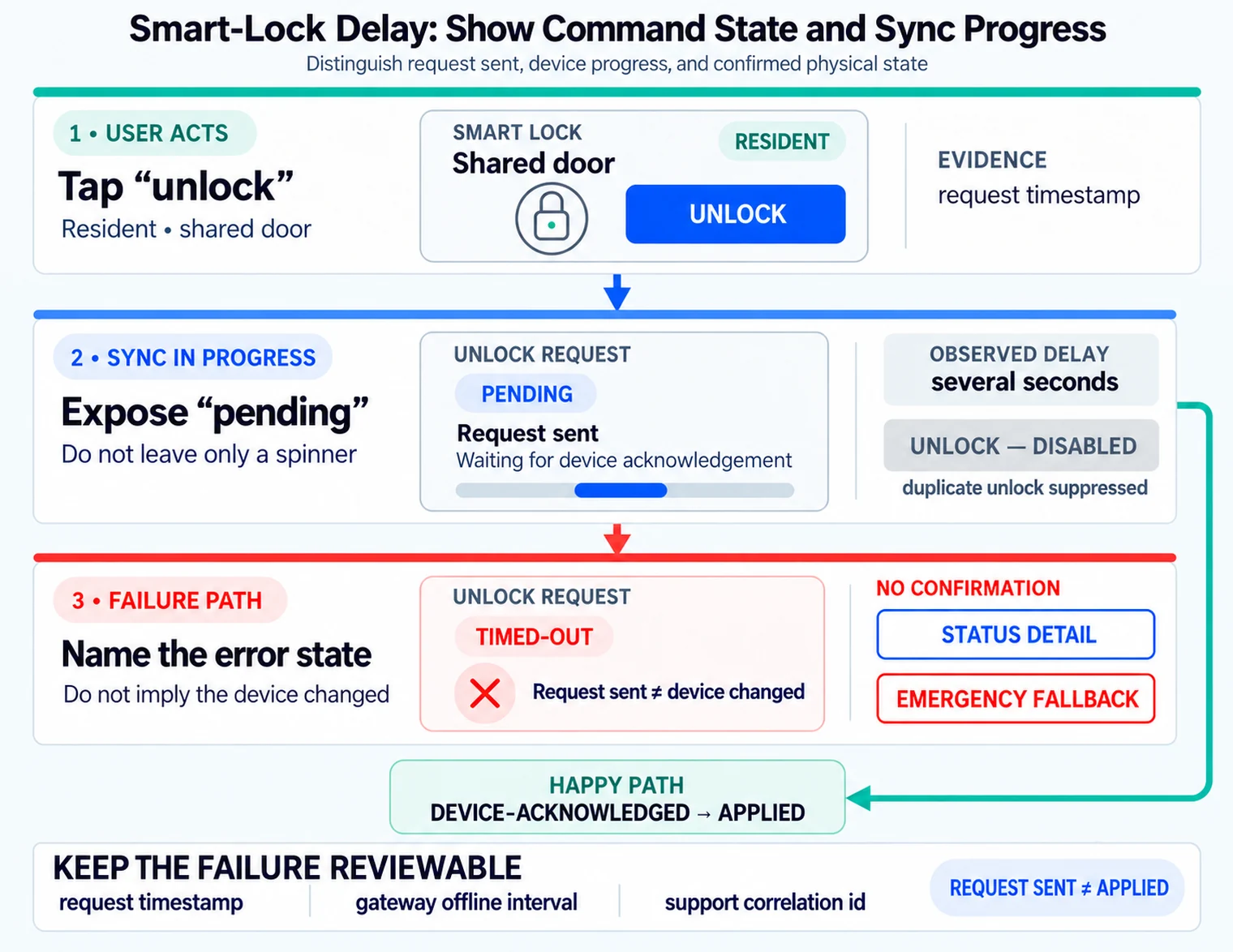
The state-mismatch case adds sync progress and a clear discrepancy message.
- A clear screen can still be a poor interaction if it hides stale sensor data, delays a command without feedback, or gives a user no local recovery path when the internet connection is down.
- A door unlock request, irrigation override, pump alarm, wearable consent prompt, or room-occupancy dashboard all need different visibility, control, recovery, and privacy choices.
- Visible state prevents the product from overstating certainty.
Major section
Principles Protect Interaction (continued)
The principle is useful only when it changes what the team designs or tests.
- Complex setup calls for staged guidance and recovery that preserves completed work.
- Multi-user conflict needs ownership, permissions, and an activity log so people can explain a surprising change.
- For that reason, interaction principles should be reviewed as a chain from evidence to behavior.
Major section
Principles Protect Interaction (continued)
These responses turn broad design principles into behaviour that can be observed during a failure, when reassurance alone is least useful.
- Feedback closes the loop after the user acts.
- Control and recovery keep the person from being trapped by cloud, account, permission, or sensor failure.
- Accessibility and trust checks keep the result usable in the physical setting, not only in a design review meeting.
Major section
Tie Principles to Mechanisms
For a room occupancy card, rows might cover fresh sensor event, stale last-known event, gateway offline, conflicting sensors, manual override, privacy-restricted room, and support escalation.
- For setup flows, that may include BLE advertising state, QR-code setup payloads, Matter commissioning windows, Wi-Fi provisioning, OAuth consent, and account role assignment.
- The output should be visible in the prototype and in implementation artifacts.
- A practical review table usually has one row per critical state transition.
Major section
Tie Principles to Mechanisms (continued)
For a room occupancy card, rows might cover fresh sensor event, stale last-known event, gateway offline, conflicting sensors, manual override, privacy-restricted room, and support escalation.
- For live operation, it may include MQTT retained messages, device-shadow desired and reported state, command acknowledgements, event timestamps, Web Push, Firebase Cloud Messaging, Apple Push Notification service, SMS fallback, or local LED/haptic feedback.
- A Figma flow, ESP32 bench rig, Home Assistant automation, Node-RED dashboard, support console, OpenAPI endpoint, or firmware log can each carry part of the interaction contract if the owner and state rule are explicit.
- A low-fidelity flow can test wording and task sequence.
Major section
Tie Principles to Mechanisms (continued)
Each row should name the user-facing copy, icon or physical cue, data source, freshness limit, retry or override rule, accessibility constraint, telemetry event, and owner.
- A bench rig or simulator can test timing, command acknowledgement, duplicate tap handling, and offline recovery.
- A seeded support-console record can test whether support sees the same stale/offline evidence the user saw.
- If the review cannot point to the artifact that proves a principle, the principle is still only an intention.
Major section
Interaction Quality Needs State
A dashboard says a room is clear because an occupancy model inferred it, while the gateway is offline.
- A notification says a pump fault is urgent, while the sensor confidence is low and the maintenance role is off shift.
- Designers need enough implementation detail to avoid these mismatches.
- The vocabulary starts with a state hierarchy.
Major section
Interaction Quality Needs State (continued)
Command ids, idempotency keys, sequence numbers, acknowledgements, retained MQTT state, device-shadow version numbers, clock skew, battery thresholds, retry budgets, firmware rollback state, and support correlation ids all affect what the user should see.
- Under-the-hood review does not turn designers into backend owners; it gives the interaction a truthful vocabulary.
- A commanded value is what the cloud or gateway sent.
- An applied value is what the device confirmed.
Major section
Interaction Quality Needs State (continued)
A displayed value is what the interface currently shows.
- Implementation choices decide whether the interface can tell that truth.
- MQTT quality of service and retained messages affect what a reconnecting client may believe.
- Device-shadow versions and ETags help reject stale updates.
- Idempotency keys stop duplicate taps from becoming duplicate physical actions.
Major section
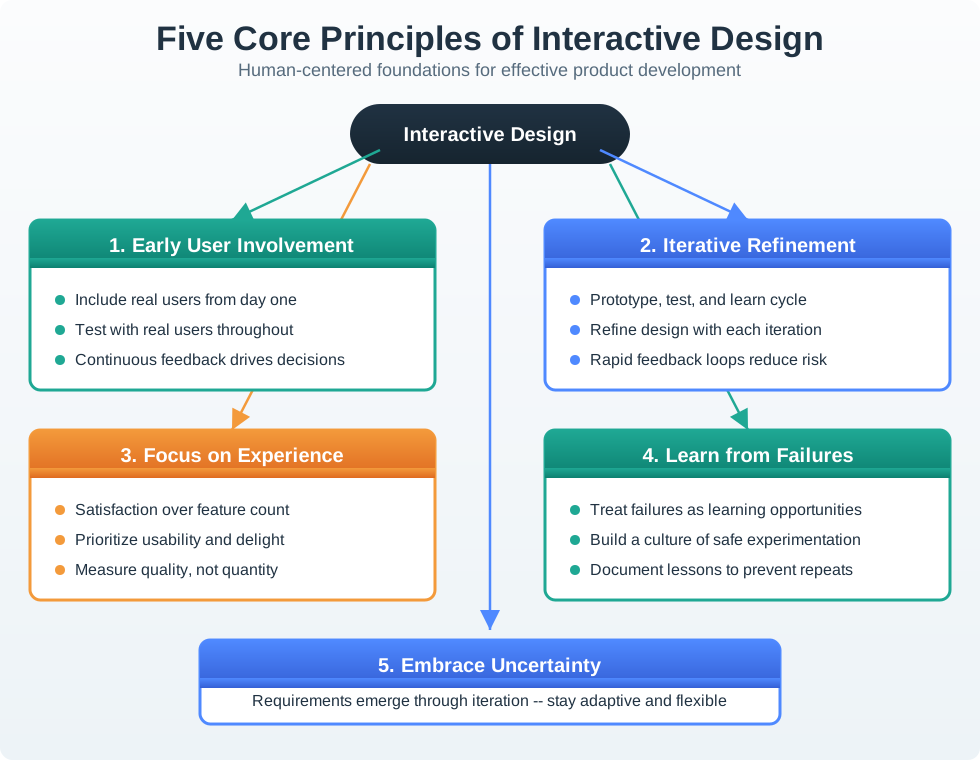
Interaction Principle Map
The first screen says Open after the command is sent; the review exposes that the device only reported the command as: Queued; the revised screen shows: Pending until the device confirms the result.
- A commanded value is only what the cloud or gateway sent, while an applied value is what the device confirmed.
- The redesign keeps the displayed state Pending while work is still in progress and changes to: Open only when device evidence supports that result.
- Each element answers a different question: what is happening, how is it conveyed, what can the person change, and what happens if the path breaks.
Deck summary
Key takeaways
The design must show what the system is doing and what the person can do next.
- The room may be loud or dark.
- A sound design still has to work on a bad day.
- It should not make the user decode a long list before taking a safe step.
- The principles are not decoration rules.
Retrieval practice
Recall check 1 of 2

UX Uma says: answer from memory, then check your reasoning.
Q1A team is reviewing a smart-building dashboard that shows an occupied room even when the gateway is offline. Which review record is strong enough to guide the interaction fix?
Show answer
Answer: D A reviewable IoT UX decision ties the person, task, context, touchpoints, connected states, feedback, recovery, constraints, validation evidence, and change condition together before the design is trusted.
Retrieval practice
Recall check 2 of 2
UX Uma says: answer from memory, then check your reasoning.
Q2A lock command is queued while the gateway is offline. What status should the app show?
Show answer
Answer: A The command and device state are different facts.
Q3Two room controls use the same icon but one controls a fan and one a door. What review action is most useful?
Show answer
Answer: B Task context and feedback determine whether the mapping works.
Print reference
Answers
Answer key.
- D · A reviewable IoT UX decision ties the person, task, context, touchpoints, connected states, feedback, recovery, constraints, validation evidence, and change condition together before the design is trusted.
- A · The command and device state are different facts.
- B · Task context and feedback determine whether the mapping works.