IoT Interfaces, Location and Privacy · Study deck
Interaction Patterns: State and Feedback
A phone can show success before the device has changed.
UX Uma is your guide for this deck.

After studying this chapter
Learning objectives
You will be able to:
- Implement Optimistic UI Updates: Provide immediate feedback while commands travel to devices
- Design Distributed State Synchronization: Keep multiple interfaces synchronized with a single source of truth
- Apply Notification Escalation: Create intelligent alert systems that avoid fatigue while ensuring critical events get attention
- Match Feedback to Action Importance: Design appropriate response timing and modality for different action types
Major section
Start With the Decision · Start Simple
A phone can show success before the device has changed.
- The design must separate a request from a confirmed state.
- The button changes colour at once, but the heater has lost its connection and never starts.
- The interface accepts the request.
- The device may confirm the change.
Major section
MVU: Minimum Viable Understanding · Make Delay Visible
Core concept: Network latency is unavoidable in IoT, so interfaces must provide immediate visual feedback (optimistic updates) while commands travel to devices, then reconcile with actual state on success or failure.
- The interface must respond immediately while staying honest about the final device state.
- Good interaction design turns those questions into visible states.
Major section
Design State Pairs
Useful columns include trigger, affected device, optimistic copy, disabled or allowed follow-up actions, command id, authoritative event, timeout threshold, rollback state, user-facing explanation, accessibility feedback, and support evidence.
- Pending, confirmed, rejected, stale, and escalated states need non-color indicators, readable text, focus behavior, screen-reader announcements where appropriate, and input paths that do not depend on precise tapping during a moving status change.
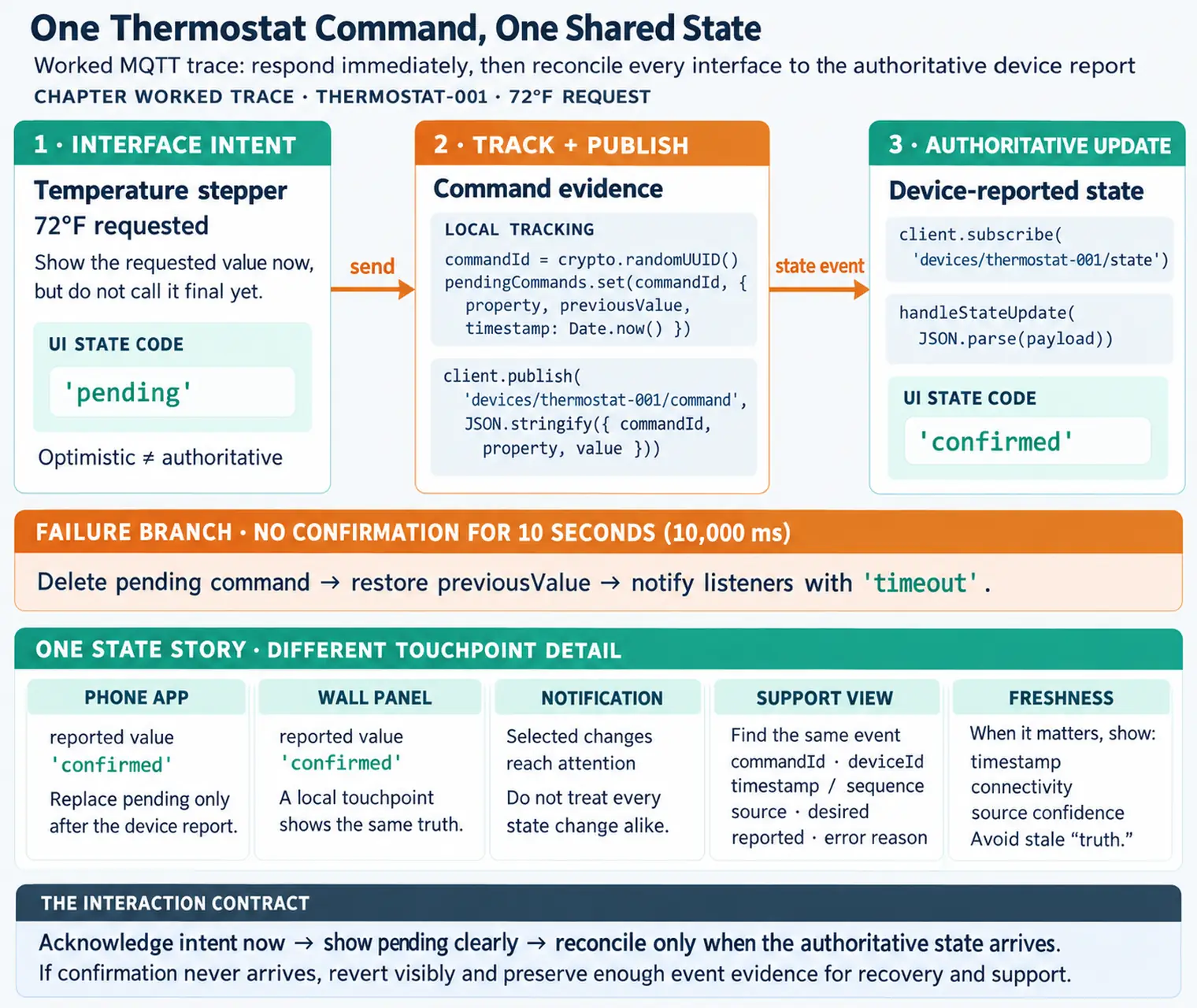
- For a temperature stepper, the optimistic state might be "72 degrees requested" while duplicate taps are merged for a short debounce window.
- Acceptance criteria should test both speed and honesty.
Major section
Design State Pairs (continued)
The authoritative event might be a reported setpoint from the device shadow, MQTT topic, or WebSocket stream.
- If confirmation does not arrive before the timeout, the UI should show the last known actual value, the requested value, and the next action: retry, queue for later, check connectivity, or use local controls.
- A smart lock test should include the mobile app, the lock reader or keypad, and the support view if support handles failed commands.
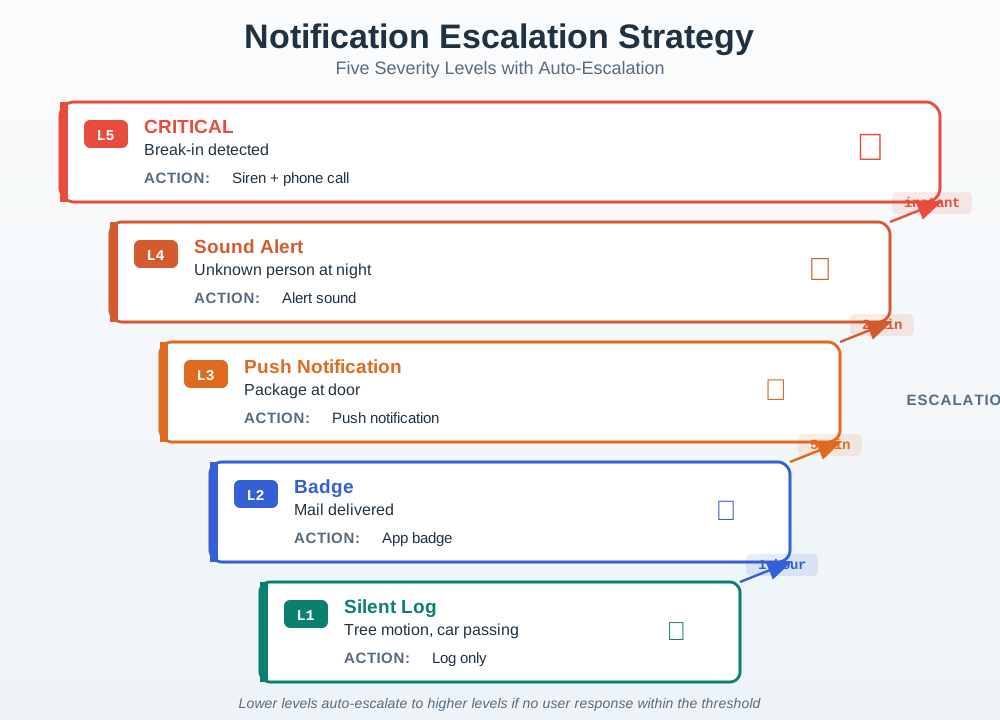
- A camera notification test should include phone settings, in-app notification preferences, event history, quiet hours, activity zones, and the escalation rule for night or unknown-person events.
Major section
Design State Pairs (continued)
If the pattern only works on a perfect network with one user and one interface, it is not ready for an IoT product.
- A facilities dashboard test should include a live value, stale timestamp, source device, threshold rule, acknowledgement owner, and exportable incident record.
- A disabled control should explain why it is disabled or expose a nearby status detail.
- A high-priority alert should not rely on sound alone; it should leave a persistent, reviewable state.
Major section
Synchronization as UX Problem
One command now has user-visible states.
- A dashboard, app, physical switch, voice assistant, and support console can all show different truths if freshness, source, ordering, and conflict policy are not visible.
- The implementation needs explicit hooks for those states.
- Command APIs should return a command id or idempotency key so retries do not create extra physical actions.
Major section
Synchronization as UX Problem (continued)
MQTT and WebSocket updates are common ways to push authoritative changes back to interfaces.
- Good UX therefore exposes enough distributed-system behavior for the user to act safely: pending, stale, unreachable, overridden, denied, confirmed, and reverted are different states and need different feedback.
- Ordering is another product concern.
- Notification escalation also depends on implementation detail.
Major section
Synchronization as UX Problem (continued)
Event streams should include device id, sequence number or timestamp, source, desired state, reported state, and error reason.
- MQTT retained messages can help a newly opened dashboard learn the latest reported state, while WebSocket streams can keep browser or mobile sessions synchronized.
- Both still need freshness policy: a retained value from yesterday should not look the same as a value received five seconds ago.
- A dismissed notification is not the same as an acknowledged incident.
Major section
Synchronization as UX Problem (continued)
The UI should render timestamp, connectivity, and source confidence when the distinction changes the user's next action.
- A physical button, mobile app, automation rule, and voice assistant can all send commands close together.
- Last-write-wins may be acceptable for a lamp, but it can be dangerous for heaters, locks, pumps, or access control.
- The interface should expose the result in plain language instead of leaking internal phrases like race condition or stale write.
Major section
Synchronization as UX Problem (continued)
APNs and FCM can deliver push messages, but the product still needs event classification, duplicate suppression, quiet-hours policy, acknowledgement state, escalation timer, digest generation, and audit history.
- A muted camera zone is not the same as a resolved event.
- Logs that include command id, account role, device firmware, gateway id, network status, battery state, retry count, notification severity, and correlation id let support explain what happened without asking the user to reproduce the failure blindly.
- The implementation is doing its job when the interface can be fast, truthful, accessible, and diagnosable at the same time.
Major section
Checkpoint: Delay and Authority · Interaction Pattern Basics
When you tap "turn off lights" on your phone, the command travels over Wi-Fi to a hub, then via Zigbee to the bulb -- a journey that takes 200-500 milliseconds.
- Meanwhile, you are staring at the button wondering if it worked.
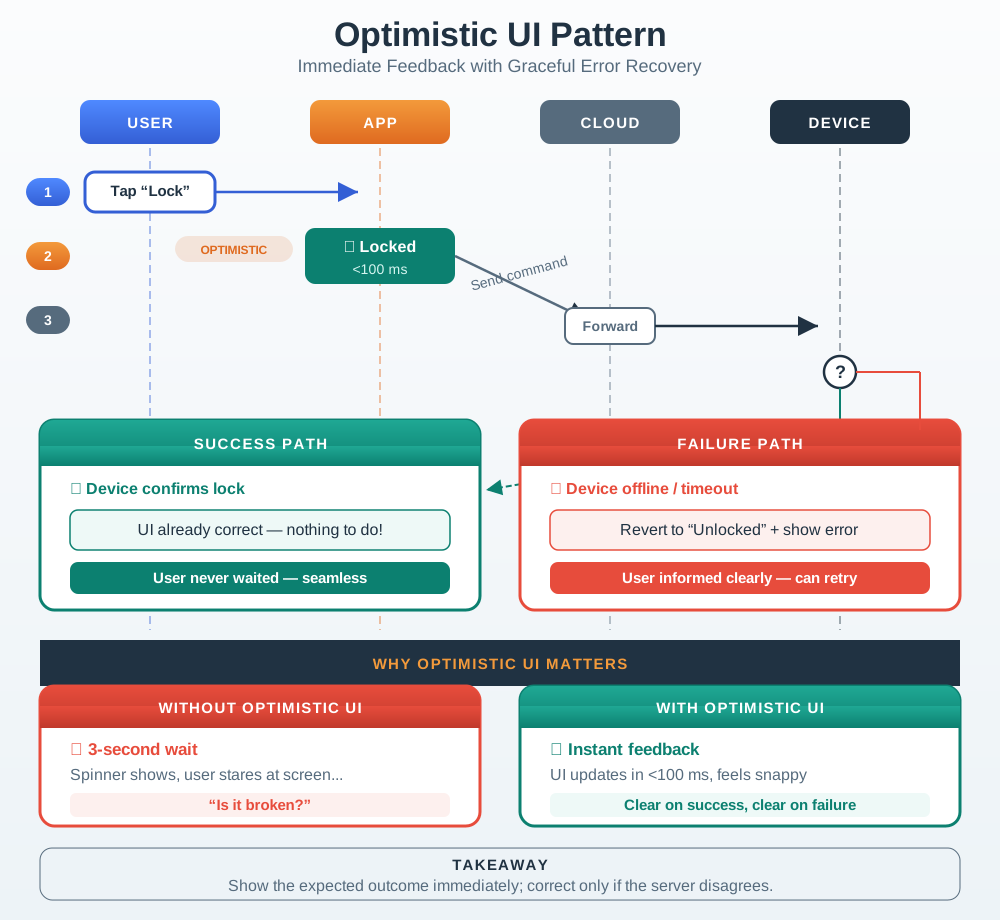
- The most important one is optimistic UI: the app immediately shows "lights off" (before the command even reaches the bulb), then quietly confirms or corrects when the real response arrives.
- This chapter covers the patterns that make IoT interfaces feel instant and trustworthy despite the unavoidable network delays underneath.
Major section
Core Interaction Patterns
Network latency is a fundamental challenge in IoT interfaces.
- The user taps once, and the app promptly shows pending while the command moves through cloud and device.
- That message acknowledges intent; it does not say the door is locked.
- Duplicate toggles are suppressed while the outcome is unknown.
- IoT devices often have multiple interfaces (app, voice, physical controls).
Major section
Core Interaction Patterns (continued)
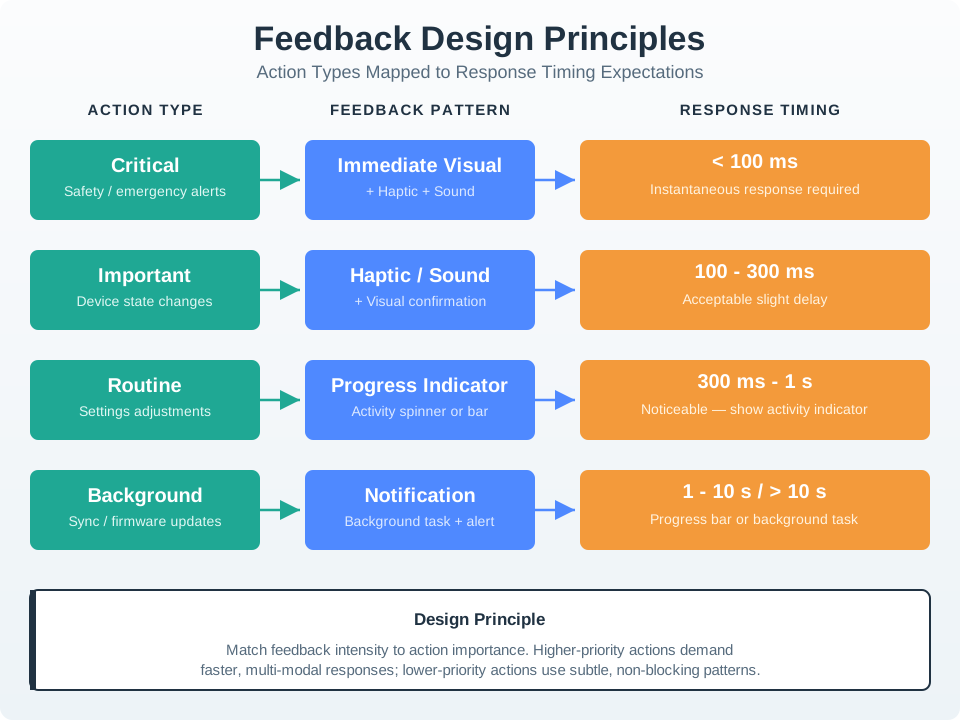
The timing chart in Figure: Feedback Design Principles aligns urgency, modality, and timing so the interface can set an honest expectation.
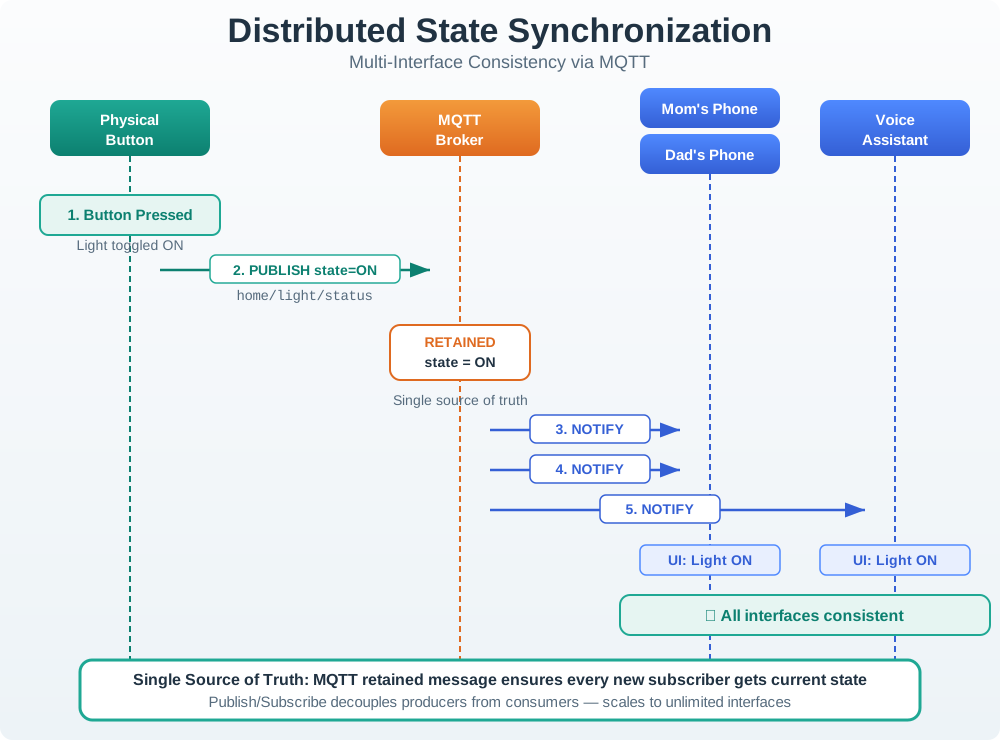
- A button turns the light on and publishes a status message to the MQTT broker.
- The retained message gives a new subscriber the latest published state in this example.
- Single Source of Truth: Device state is authoritative.
Major section
Core Interaction Patterns (continued)
The phones and voice assistant subscribe to that status, so their displays can follow the device rather than guessing from a local tap.
- Shared displays should show uncertainty when the network or device has not supplied a current update.
- An advice item may wait 1 hour, or 60 min, while a grave event may wait only 2 min.
- Each level needs an owner, a repeat check, and a safe step when no one responds.
Major section
Core Interaction Patterns (continued)
Feedback should reflect the consequence and expected duration of an action, not apply the same spinner or alert to everything.
- Across Figure: Feedback Design Principles, a Critical safety alert pairs immediate visual, haptic, and sound feedback with a target below 100 ms.
- An: Important device-state change tolerates 100–300 ms but still needs haptic or sound plus visual confirmation.
- The hierarchy links the chapter's interaction patterns to consequence: stronger feedback is reserved for the actions that demand attention fastest.
- This sequence matters for a lock because an early success label could invite the person to leave before the physical state is known.
Deck summary
Key takeaways
A phone can show success before the device has changed.
- Core concept: Network latency is unavoidable in IoT, so interfaces must provide immediate visual feedback (optimistic updates) while commands travel to devices, then reconcile with actual state on success or failure.
- Useful columns include trigger, affected device, optimistic copy, disabled or allowed follow-up actions, command id, authoritative event, timeout threshold, rollback state, user-facing explanation, accessibility feedback, and support evidence.
- The authoritative event might be a reported setpoint from the device shadow, MQTT topic, or WebSocket stream.
- One command now has user-visible states.
Retrieval practice
Recall check 1 of 3

UX Uma says: answer from memory, then check your reasoning.
Q1A tenant taps Heat now and the app changes color before the offline heater responds. What should that immediate feedback mean?
Show answer
Answer: B The chapter separates requested, accepted, confirmed, and observed states.
Retrieval practice
Recall check 2 of 3
UX Uma says: answer from memory, then check your reasoning.
Q2A remote device has not yet acknowledged an app command. Which interface behavior fits the chapter?
Show answer
Answer: B The pattern acknowledges intent quickly while preserving uncertainty about completion.
Retrieval practice
Recall check 3 of 3
UX Uma says: answer from memory, then check your reasoning.
Q3A camera sends routine motion alerts all day. A night intrusion alert must still reach someone. Which rule should the team use?
Show answer
Answer: D Group routine events, keep incident acknowledgement separate, and escalate unacknowledged high-risk events.
Print reference
Answers
Answer key.
- B · The chapter separates requested, accepted, confirmed, and observed states.
- B · The pattern acknowledges intent quickly while preserving uncertainty about completion.
- D · Group routine events, keep incident acknowledgement separate, and escalate unacknowledged high-risk events.