Bluetooth & BLE · Study deck

Pairing Methods and MITM Protection

A resident pairs a phone with a new door lock while another person waits in the hallway.

Radio Remi is your guide for this deck.

securitypairingmethods
Radio Remi, the module guide, in a scene from this chapter.
iotclass.org

After studying this chapter

Learning objectives

You will be able to:

  • Explain the BLE Pairing Protocol: Describe the three-phase pairing sequence and what keys are exchanged in each phase
  • Compare Pairing Methods: Analyze Just Works, Passkey Entry, Numeric Comparison, and OOB pairing across security level and I/O requirements
  • Diagnose Just Works Vulnerabilities: Justify why TK=0 in legacy Just Works provides no MITM protection and when it is acceptable
  • Select Appropriate Pairing: Evaluate device capabilities and threat model to choose and configure the correct pairing method
iotclass.org

Major section

Start With the Story

A resident pairs a phone with a new door lock while another person waits in the hallway.

  • The important question is whether the resident confirmed the intended lock or merely accepted the first nearby request.
  • A secure link cannot repair a weak choice of partner made at the start.
  • This test does not protect a device whose screen, code, or stored keys are already under an attacker's control.
iotclass.org

Major section

Key Concepts

Numeric Comparison (NC): BLE 4.2+ LESC pairing method displaying a 6-digit number on both devices; user confirms they match, providing MITM protection.

  • Passkey Entry Display: One device shows a 6-digit passkey; user enters it on the other device; protects against passive eavesdropping; 1-in-10^6 brute-force probability.
  • IO Capability Matrix: How the pairing method is selected based on the IO capabilities of both devices; e.g., DisplayYesNo + KeyboardOnly → Passkey Entry; NoInputNoOutput + any → Just Works.
  • LE Secure Connections Confirmation: LESC pairing sends a cryptographic commitment (EC-DAKE protocol) before revealing the confirmation value, preventing the TK=0 attack that breaks legacy Just Works.
iotclass.org

Major section

Why Bluetooth Security Matters

Analogy:: Bluetooth security is like locking your front door.

  • No security = Leaving door wide open (anyone can walk in).
  • Wearables: unencrypted or weakly authenticated links can expose private health or location-adjacent data.
  • Medical devices: default or static passkeys weaken the pairing ceremony and can put treatment workflows at risk.

Why it matters

Access-control devices: Just Works pairing can allow an attacker nearby during setup to become the trusted device.

iotclass.org

Major section

"Just Works" Pairing: A Critical Security Flaw

Attacker completes "Just Works" pairing (no user verification required).

  • BLE's "Just Works" pairing mode provides zero authentication and is vulnerable to Man-in-the-Middle (MITM) attacks.
  • Attacker intercepts pairing request before legitimate user connects.
  • Attacker gains full access - can read data, send commands, impersonate user.
iotclass.org

Major section

Alternative View: Pairing Security as Defense Layers
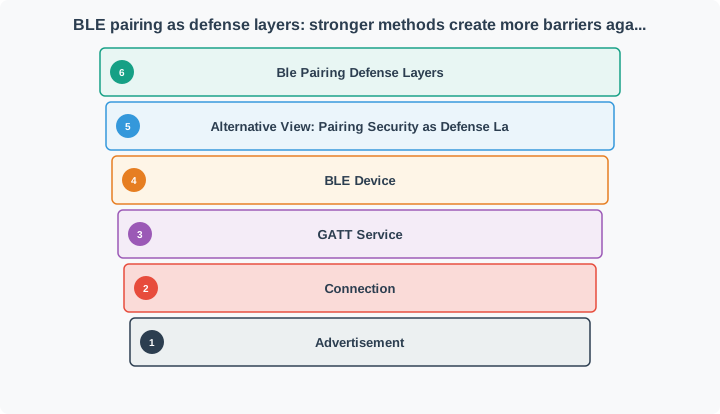
Think of pairing methods as concentric security layers. "Just Works" is an unlocked door - attackers walk right through.

  • Each stronger method (Passkey, Numeric Comparison, OOB) adds a verification barrier that creates progressively more resistance to MITM attackers.
BLE pairing methods as defense layers from Just Works through Passkey Entry, Numeric Comparison, and Out of Band setup.
iotclass.org

Major section

BLE Pairing Process

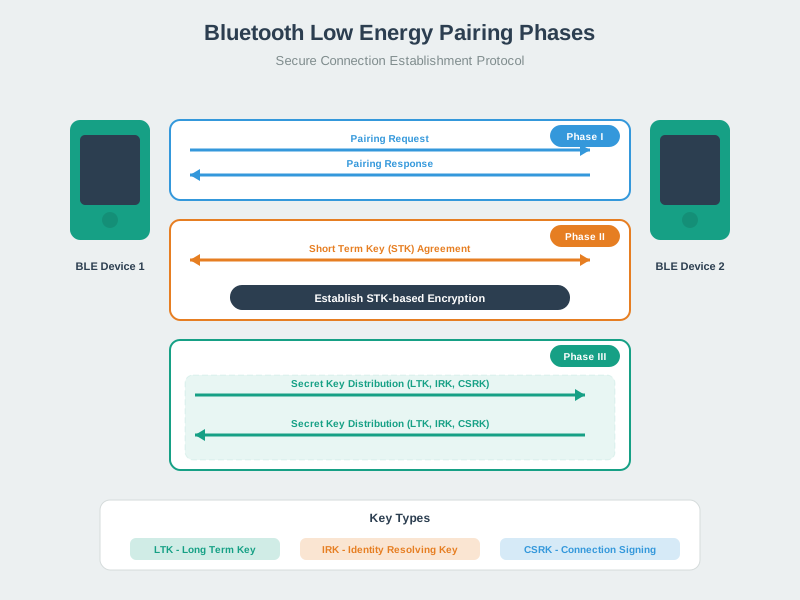
The BLE pairing process establishes secure communication through distinct decisions.

  • Phase II authenticates according to that method and establishes protection for the current exchange.
  • Phase III distributes the keys needed for later encryption, private-address resolution, or signed data when bonding is requested.

Key terms

Numeric Comparison
Numeric Comparison is exclusive to LE Secure Connections (BLE 4.2+) — it is not available in Legacy Pairing.
Just Works
Just Works are available in both Legacy Pairing and LE Secure Connections.
Source: University of Edinburgh IoT Security Course
iotclass.org

Major section

Academic Reference: BLE Numeric Comparison Authentication (University of Edinburgh)
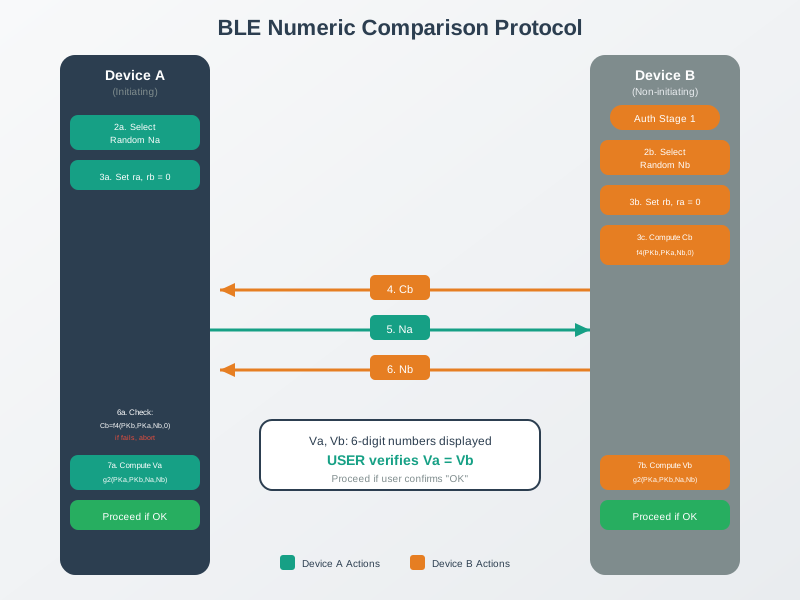
Pairing proceeds only after the user verifies that the displays match.

  • An active relay establishing two different key exchanges cannot silently make both authenticated transcripts agree.
BLE numeric comparison pairing protocol flow
iotclass.org

Major section

Common Beginner Mistakes

Mistake 1: "My device has Bluetooth, so it's secure".

  • Wrong!: Many BLE devices use "Just Works" pairing (no MITM protection during setup).
  • Wrong!: If pairing mode is "Just Works", password doesn't help.
  • Mistake 3: "Bluetooth only works 10 meters, so I'm safe from hackers".
iotclass.org

Major section

Common Misconception: "My Device Has Encryption, So It's Secure"

The misconception: "If BLE link encryption is enabled, my system is secure.".

  • The reality:: Link encryption protects confidentiality/integrity after two devices agree on keys.
  • The pairing method and your authorization logic determine who gets those keys and what they can do.
  • BLE link-layer encryption is AES-CCM with 128-bit keys (you do not "choose AES-256" at the BLE link layer).
iotclass.org

Major section

Dig Deeper and Practice

BLE pairing security is a setup ceremony, not just a cipher choice.

  • Just Works can encrypt a link but gives no user-authenticated MITM protection.
  • LE Secure Connections uses P-256 ECDH to protect against passive key recovery, while Numeric Comparison, Passkey Entry, or OOB evidence is still needed for active MITM resistance.
  • Bonding stores LTK, IRK, and CSRK material for reconnection, so stored-key protection and revocation are part of the pairing design.
iotclass.org

Deck summary

Key takeaways

A resident pairs a phone with a new door lock while another person waits in the hallway.

  • Numeric Comparison (NC): BLE 4.2+ LESC pairing method displaying a 6-digit number on both devices; user confirms they match, providing MITM protection.
  • Analogy:: Bluetooth security is like locking your front door.
  • Attacker completes "Just Works" pairing (no user verification required).
  • Think of pairing methods as concentric security layers. "Just Works" is an unlocked door - attackers walk right through.
iotclass.org

Retrieval practice

Recall check 1 of 5

Radio Remi says: answer from memory, then check your reasoning.

Q1A reviewer is checking the Bluetooth security decision for this topic. Which evidence keeps the claim bounded?

AA statement that Bluetooth is common in consumer devices, without checking this deployment
BA successful connection screenshot with no power, security, or failure-behavior evidence
CPairing method, I/O assumptions, key storage, encryption level, authorization boundary, recovery plan.
DA decision to defer retest triggers until after deployment problems appear
Show answer

Answer: C Bluetooth security review should separate pairing, encryption, key management, authorization, and recovery evidence.

iotclass.org

Retrieval practice

Recall check 2 of 5

Radio Remi says: answer from memory, then check your reasoning.

Q2A BLE medical glucose monitor has a small display and two physical buttons. Which pairing method should the designer configure, and why?

AJust Works — it requires the least user effort during medical device setup
BNumeric Comparison — both devices can display the 6-digit code and the buttons allow Yes/No confirmation
CPasskey Entry — the display shows the PIN and the buttons let the user type digits
DOOB via NFC — this is always the strongest option regardless of hardware
Show answer

Answer: B With a display and Yes/No buttons, the monitor satisfies the I/O requirements for Numeric Comparison.

iotclass.org

Retrieval practice

Recall check 3 of 5

Radio Remi says: answer from memory, then check your reasoning.

Q3What is the primary security weakness of BLE 'Just Works' pairing?

AIt uses weak AES-64 encryption that can be broken in seconds
BIt provides no authenticated user verification during pairing
CIt only works with Bluetooth Classic, not BLE
DIt requires both devices to have displays, which most IoT devices lack
Show answer

Answer: B Just Works has zero authentication bits -- there is no verification step during pairing.

iotclass.org

Retrieval practice

Recall check 4 of 5

Radio Remi says: answer from memory, then check your reasoning.

Q4What is the key security trade-off when enabling BLE bonding?

ABonding disables encryption to allow faster reconnection
BStored bond keys simplify reconnection but become sensitive secrets
CBonding prevents devices from connecting to any other Bluetooth device
DBonding is only available with Numeric Comparison pairing and cannot be used with other methods
Show answer

Answer: B Bonding saves LTK, IRK, and CSRK for future use.

iotclass.org

Retrieval practice

Recall check 5 of 5

Radio Remi says: answer from memory, then check your reasoning.

Q5A BLE smart lock has no display but includes an NFC chip. Which pairing method provides the strongest security?

AJust Works, since the lock has no display for PIN verification
BPasskey Entry with a PIN printed on the lock body
COut-of-Band (OOB) pairing using the NFC chip, requiring physical proximity to pair
DNumeric Comparison, displaying the code on the user's phone only
Show answer

Answer: C OOB pairing via NFC requires the user to physically tap their phone against the lock (within ~4 cm), ensuring physical presence.

iotclass.org

Print reference

Answers

Answer key.

  1. C · Bluetooth security review should separate pairing, encryption, key management, authorization, and recovery evidence.
  2. B · With a display and Yes/No buttons, the monitor satisfies the I/O requirements for Numeric Comparison.
  3. B · Just Works has zero authentication bits -- there is no verification step during pairing.
  4. B · Bonding saves LTK, IRK, and CSRK for future use.
  5. C · OOB pairing via NFC requires the user to physically tap their phone against the lock (within ~4 cm), ensuring physical presence.
iotclass.org