Bluetooth & BLE · Study deck
BLE Field Debugging and Internals
Picture a sensor that pairs on the bench but stops sending updates after it is installed behind a cabinet.
Radio Remi is your guide for this deck.

After studying this chapter
Learning objectives
You will be able to:
- Explain: Developers test with simple sensor values (2-4 bytes) that fit easily, then add more features (timestamps, multiple readings, metadata) pushing total payload to 30-50 bytes without realizing MTU negotiation is required.
- Explain: A single notification can carry at most ATT_MTU − 3 bytes, so either confirm a larger exchanged MTU before sending or frame the value across multiple notifications.
- Explain: For IoT sensor projects that only need BLE (no Classic Bluetooth), using Bluedroid wastes 80 kB of RAM that could be used for application buffers.
- apply field debugging tools to pairing, discovery, and coexistence issues
Major section
When the Lab Meets the Field
A green connection icon does not show where the data stopped.
- Bluetooth Low Energy is a short-range radio system designed for small data exchanges and low power; it is shortened to BLE.
- Everything in Building BLE Apps on ESP32 works on the bench.
- This chapter is about the day it does not: notifications that never arrive, connections that eat the battery, payloads that silently truncate.
- Each war story ends with the evidence that would have caught it — and the internals section explains what the stack was doing all along.
Try it: When the Lab Meets the Field in the chapter
Major section
Phoebe's Field Notes: The mAh-to-Runtime Chain, and Where It Sags
The mathematical gist: With a 100 ms interval, 500 µs transmit burst at 15 mA, and 5 µA sleep current, the radio averages 0.0800 mA and a 225 mAh cell gives about 117 days.
- A missed shutdown that leaves 8 mA in “sleep” raises the average to 8.04 mA and cuts that estimate to 1.17 days.
Major section
When It Breaks in the Field
Most BLE bugs are not random.
- They come from a mismatch between what the code assumes and what the protocol actually agreed to do.
- Problem: Code connects to BLE device but doesn't receive updates.
- Cause: Notifications require writing to CCCD descriptor.
- Problem: Battery drains quickly or response is too slow.
Major section
Start With the Story
Reproduce one symptom, capture the radio and application evidence, change one variable, and keep the smallest explanation that makes the deployed behavior understandable.
- Cause: Default ATT MTU is 23 bytes, leaving 20 bytes for one notification value.
- Key Insight: The default ATT MTU is 23 bytes.
- Not every field failure is a notification, interval, or MTU bug.
Major section
Start With the Story (continued)
A single notification can carry at most ATT_MTU − 3 bytes, so either confirm a larger exchanged MTU before sending or frame the value across multiple notifications.
- The field failure rarely says "Bluetooth is broken." It says notifications stopped, the battery collapsed, the MTU was too small, the connection interval drifted, or the lab trace no longer matches the installed device.
- This often manifests as "missing bytes" or "corrupted readings" that work fine in testing with short payloads but fail in production with full data.
- ESP32's Bluedroid BLE stack requires ~120 kB RAM; NimBLE requires only ~40 kB.
Major section
Start With the Story (continued)
Developers test with simple sensor values (2-4 bytes) that fit easily, then add more features (timestamps, multiple readings, metadata) pushing total payload to 30-50 bytes without realizing MTU negotiation is required.
- A 247-byte target is common but is not the ATT maximum or guaranteed by BLE 4.2.
- For IoT sensor projects that only need BLE (no Classic Bluetooth), using Bluedroid wastes 80 kB of RAM that could be used for application buffers.
- BLE event handlers (NimBLE ble_hs_cfg.sync_cb, gap_event_cb) run in the NimBLE host task context.
Major section
Start With the Story (continued)
Setting BLE_SM_IO_CAP_NO_INPUT_NO_OUTPUT (Just Works pairing) for a device that stores sensitive user data provides zero MITM protection.
- Just Works can produce an unauthenticated LTK if an unauthorized central is allowed into the pairing window.
- When these failures are under control, the build starts looking like a product rather than a lab.
- The closing sections keep the same ideas but ask the production questions: power, security, evidence, and what to study next.
Major section
Under the Hood: Parameters, Payloads, and Internals
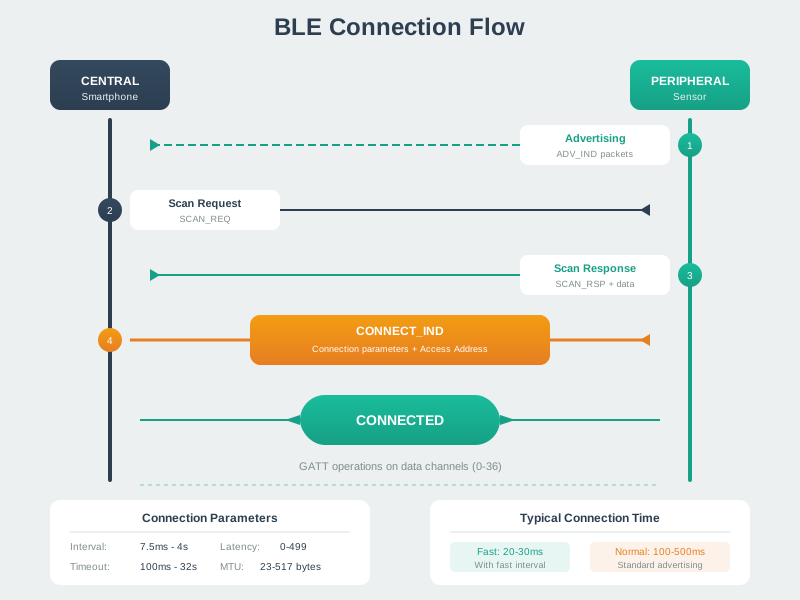
A link now exists, but service discovery, security, subscription, and ATT/GATT readiness can still fail before application data moves.
- Those values explain whether a later delay is expected scheduling, a readiness failure, or a lost link.
Deck summary
Key takeaways
A green connection icon does not show where the data stopped.
- The mathematical gist: With a 100 ms interval, 500 µs transmit burst at 15 mA, and 5 µA sleep current, the radio averages 0.0800 mA and a 225 mAh cell gives about 117 days.
- Most BLE bugs are not random.
- Reproduce one symptom, capture the radio and application evidence, change one variable, and keep the smallest explanation that makes the deployed behavior understandable.
- A single notification can carry at most ATT_MTU − 3 bytes, so either confirm a larger exchanged MTU before sending or frame the value across multiple notifications.
Retrieval practice
Recall check 1 of 5

Radio Remi says: answer from memory, then check your reasoning.
Q1Per this chapter's 'notifications never arrive' war story, why does calling characteristic.read() once fail to deliver ongoing updates?
Show answer
Answer: A see answers page
Retrieval practice
Recall check 2 of 5

Radio Remi says: answer from memory, then check your reasoning.
Q2Per this chapter's 'connection interval mismatch' war story, why can battery drain quickly or response feel sluggish when a device is left on the default connection interval?
Show answer
Answer: A see answers page
Retrieval practice
Recall check 3 of 5

Radio Remi says: answer from memory, then check your reasoning.
Q3What is the default BLE MTU size and why does it matter for IoT data transfer?
Show answer
Answer: B The default ATT MTU is 23 bytes, leaving up to 20 bytes in one notification.
Retrieval practice
Recall check 4 of 5

Radio Remi says: answer from memory, then check your reasoning.
Q4In an office with 50 nearby 2.4 GHz Wi-Fi networks and 20 BLE sensors, a channel trace links intermittent sensor disconnections to Wi-Fi interference. Which mitigation should the team test first?
Show answer
Answer: D The channel trace supplies the interference premise.
Retrieval practice
Recall check 5 of 5

Radio Remi says: answer from memory, then check your reasoning.
Q5This chapter's rule is supervision_timeout > (1 + peripheral_latency) x connection_interval x 2. For a connection with a 1 s interval and peripheral latency of 9, what does the chapter say about using a 10 s supervision timeout?
Show answer
Answer: A The chapter's formula is supervision_timeout > (1 + peripheral_latency) x connection_interval x 2.
Print reference
Answers
Answer key.
- A · The chapter's Mistake 1 names the cause directly: 'Notifications require writing to CCCD descriptor.' The fix writes 0x01 0x00 to descriptor UUID 0x2902; a bare read() only returns a one-time value and does not subscribe the client to future notifications.
- A · The chapter's recommended-interval table ties interval choice to application: game controller 7.5-15ms, fitness tracker 100-200ms, temperature sensor 1000-4000ms. Using the default interval instead of one matched to the application is what causes the battery drain or sluggish response in this war story.
- B · The default ATT MTU is 23 bytes, leaving up to 20 bytes in one notification.
- D · The channel trace supplies the interference premise.
- A · The chapter's formula is supervision_timeout > (1 + peripheral_latency) x connection_interval x 2.
