IoT Interfaces, Location and Privacy · Study deck
Accessible IoT: Interface Foundations
In IoT, the same device state can appear on a screen, phone, watch, speaker, or physical control.
UX Uma is your guide for this deck.

After studying this chapter
Learning objectives
You will be able to:
- Explain: Screen readers, scan gestures, camera-based controls, and desktop aids need stable landmarks, feedback after each move, recovery from a wrong level, and gestures that do not clash with the operating system.
- Explain: A thermostat user should be able to change the setpoint through touch, physical control, voice, or a screen reader path, and should receive confirmation in a form they can perceive.
- Explain: EVERYONE liked these features: Dad used voice control while cooking, little Timmy liked the big buttons, and Mom loved the clear display when the lights were dim.
- Create consistent experiences across multiple devices
Major section
Start Simple
Accessibility means making a product usable by people with different abilities.
- In IoT, the same device state can appear on a screen, phone, watch, speaker, or physical control.
- “If a tired person at 2am can’t use it, the feature doesn’t exist yet — design for the worst moment, not the demo.”.
Major section
For Kids: Meet the Sensor Squad!
Making IoT devices that EVERYONE can use - including people who can't see, hear, or move easily!
- The Sensor Squad was visiting Grandma Betty's new smart home.
- "The text is so small, I can't read the temperature," said Grandma Betty, squinting at the device.
- Temperature Terry had an idea!
Major section
For Kids: Meet the Sensor Squad! (continued)
It could SAY the temperature out loud!" the LED got excited: "And we could make the buttons REALLY BIG - bigger than your thumb!".
- EVERYONE liked these features: Dad used voice control while cooking, little Timmy liked the big buttons, and Mom loved the clear display when the lights were dim.
- Designing for people with different abilities can make an interface easier to use in other situations too.
- Voice can help when someone cannot read the screen or has their hands occupied.
- Larger buttons make touch interaction easier, while a readable display helps in dim lighting.
Major section
Accessibility Follows Device State
Accessible IoT design is more than one readable app screen.
- The same state may appear on a physical control, phone, watch, voice assistant, wall tablet, web page, notice, and support view.
- A person may not see the device, hear an alert, make a precise gesture, or remember a long set of steps.
- Wearable controls need extra checks.
Major section
Accessibility Follows Device State (continued)
They still need to know what the system believes and what action is available.
- Touch is one path and: Voice is another.
- No single sense or precise movement should be the only way to use a critical feature.
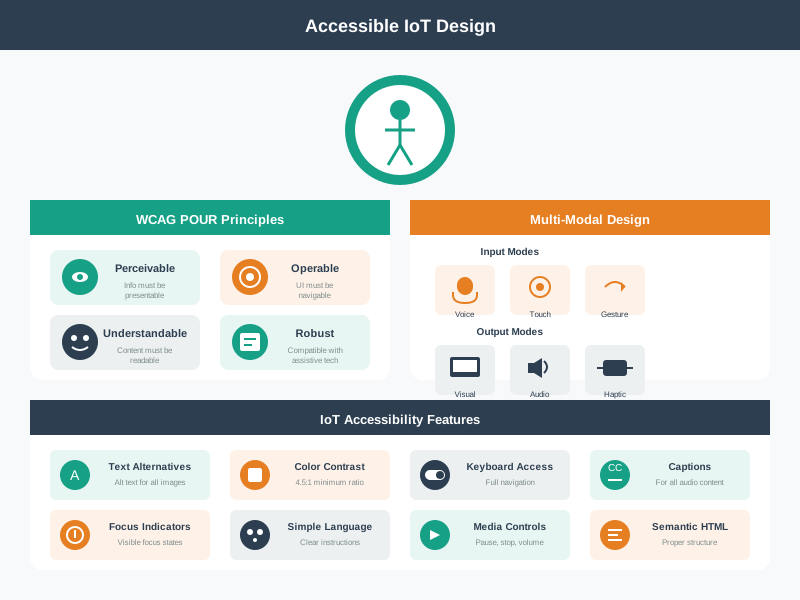
- The alternate controls are touch, voice, gesture, keyboard, and physical control; readable text, speech, sound, and vibration provide outputs.
Major section
Accessibility Follows Device State (continued)
VoiceOver starts pairing; an offline gateway triggers a live “still trying” message and a local-reset path instead of a silent spinner.
- Each path must name the state, explain delay or failure, and offer a safe fallback.
- The last band records the test evidence.
- Accessible design also covers temporary and situational limits.
Major section
Accessibility Follows Device State (continued)
Designing for permanent disability often reveals the same fallback paths that make the product robust in ordinary field conditions.
- Each state needs at least one accessible name, one perceivable signal, one operable control, and one recovery path.
- Reading, text entry, navigation, and identification need different evidence.
- A believable but wrong caption can be worse than none.
Major section
Accessibility Follows Device State (continued)
A person with low vision may need glasses, zoom, strong contrast, and a steady focus order.
- If a state matters for safety, access, medication, comfort, or privacy, do not rely on color, sound, animation, voice, or touch alone.
- For example, a smart-lock "offline" state should not be a gray icon that only appears in the mobile app.
- For stylus alphabets, test learning, use while moving, error correction, and entry without sight.
Major section
Accessibility Follows Device State (continued)
Crowd reports can add curb, obstacle, surface, and crossing details that sensors miss.
- A user may be wearing gloves, carrying a child, standing in bright sunlight, hearing machinery, using a cracked phone screen, or recovering from an injury.
- A blind person may need spoken thermostat state, a raised mark on a keypad, Braille labels, and a screen-reader action in the app.
- The accessibility requirement is therefore a state contract, not a style preference.
Major section
Accessibility Follows Device State (continued)
Head-worn overlays need tests for field of view, attention, battery, heat, blocked vision, and a nonvisual fallback.
- A person with limited movement may need a switch, voice, or physical buttons instead of precise screen gestures.
- For text entry on glass, test whether a person can find and recover nonvisual Braille-style gestures without raised marks.
- Moment: standing at a door that will not unlock, phone screen in bright sunlight.
Major section
Accessibility Follows Device State (continued)
Screen readers, scan gestures, camera-based controls, and desktop aids need stable landmarks, feedback after each move, recovery from a wrong level, and gestures that do not clash with the operating system.
- Indoor location tools also need orientation, route confidence, doorway or obstacle details, stale-position warnings, and a fallback when a map, beacon, camera, or network is wrong.
- Fails when: “offline” is a gray icon that only appears in the mobile app.
- Image captions must name the important content, admit low confidence, avoid guesses about emotion or identity, and allow correction.
Major section
Test Tasks Across Modalities
A thermostat user should be able to change the setpoint through touch, physical control, voice, or a screen reader path, and should receive confirmation in a form they can perceive.
- Rows should be user goals such as pair device, check status, issue command, cancel command, acknowledge alert, share access, repair permission, and contact support.
Major section
Test Tasks Across Modalities (continued)
Columns should be modalities such as screen reader, keyboard, switch control, touch, voice, physical control, haptic feedback, notification, and support console.
- Assistive workflows also need a physical-world proof.
- Evidence should include both user behavior and technical traces.
- Moment: pairing a device with VoiceOver while the gateway is offline.
Deck summary
Key takeaways
Accessibility means making a product usable by people with different abilities.
- Making IoT devices that EVERYONE can use - including people who can't see, hear, or move easily!
- It could SAY the temperature out loud!" the LED got excited: "And we could make the buttons REALLY BIG - bigger than your thumb!".
- Accessible IoT design is more than one readable app screen.
- They still need to know what the system believes and what action is available.
Retrieval practice
Recall check 1 of 3

UX Uma says: answer from memory, then check your reasoning.
Q1A resident cannot hear a critical device alert. What should the interface provide?
Show answer
Answer: C Accessible use includes noticing the state, acting, understanding, and recovery.
Retrieval practice
Recall check 2 of 3
UX Uma says: answer from memory, then check your reasoning.
Q2A worker with limited hand movement and a worker wearing thick gloves both need to stop a local device. Which design best supports broad access?
Show answer
Answer: C Provide a large physical control plus another accessible action path, with clear confirmation.
Retrieval practice
Recall check 3 of 3
UX Uma says: answer from memory, then check your reasoning.
Q3A lock shows pending on the phone but appears unlocked on a wall display. What should the accessibility review require?
Show answer
Answer: C Accessible IoT concerns the same critical state across physical and digital views.
Print reference
Answers
Answer key.
- C · Accessible use includes noticing the state, acting, understanding, and recovery.
- C · Provide a large physical control plus another accessible action path, with clear confirmation.
- C · Accessible IoT concerns the same critical state across physical and digital views.