JSON and Compact Binary Payload Bytes
Compare the byte cost of JSON and a fixed numeric binary layout for the same synthetic telemetry record.

The Application Protocols guide asks learners to compare message paths for the same reading and different needs. On iotclass.org a service worker in this lab folder plays the server; nothing leaves your browser.
Predict the reading, then compare it with the measurement.
Browser (Chromium DevTools)
Phone browserCompare the byte cost of JSON and a fixed numeric binary layout for the same synthetic telemetry record.
Open the browser lab, then inspect the real Network, Console, or Accessibility panel in DevTools.
Open the phone lab (new tab)Steps
Step 1
- Do
- In the Current result panel read the fixed synthetic telemetry source record.
- You will see
- Input: Loaded seed-0 numeric record. Observed page: Source record: {"temperatureC":21.5,"humidityPercent":48.25,"sequence":7}; UTF-8 JSON bytes: —; Numeric binary bytes: —; JSON minus binary: —; Decoded numeric fields: —. Observed DevTools: Source fields are temperatureC 21.5, humidityPercent 48.25, and sequence 7. Interpretation: The same values will enter both encoders.
- Why it matters
- Evidence: Step 1 screenshot shows the real Chromium page and DevTools panel. Mechanism: The source record is displayed before byte calculations. Boundary: The record contains no device identity yet. Next check: Encode its JSON representation.
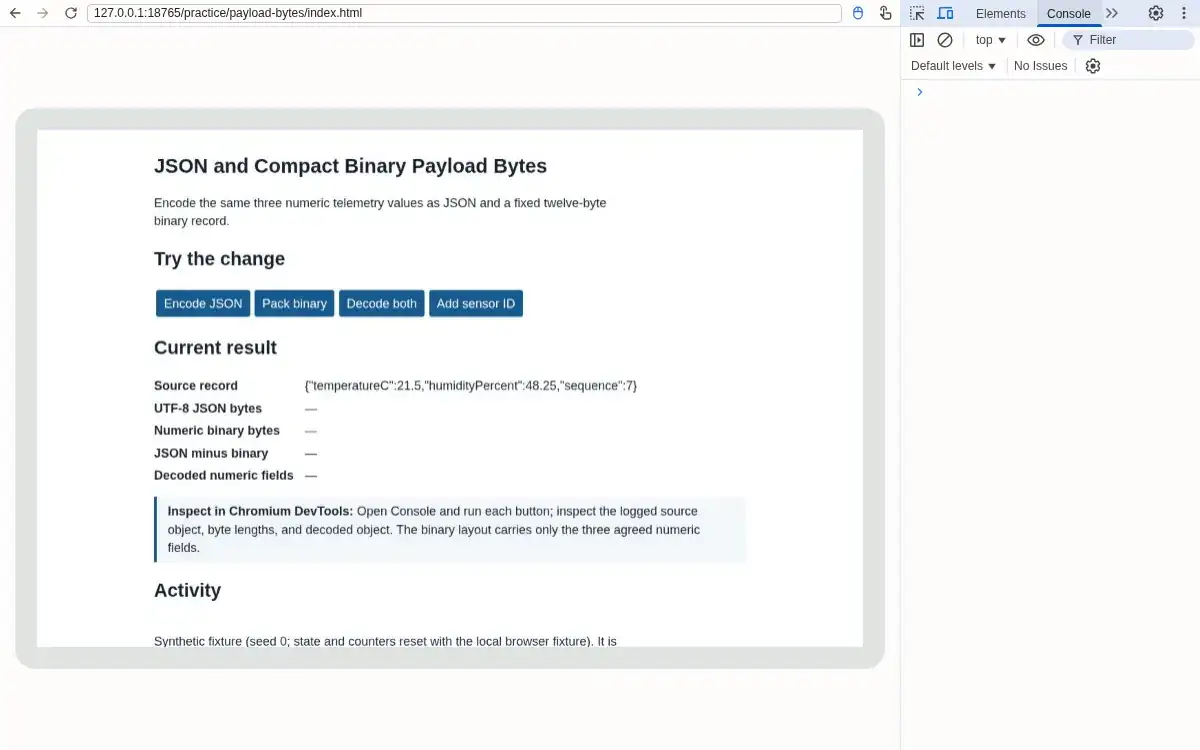
Step 1 · Browser (Chromium DevTools); numbered callout added to a real capture. Enlarge screenshot (new tab) Step 2
- Do
- In the controls panel, press Encode JSON and inspect the Console object and UTF-8 byte count.
- You will see
- Input: JSON.stringify plus TextEncoder. Observed page: Source record: {"temperatureC":21.5,"humidityPercent":48.25,"sequence":7}; UTF-8 JSON bytes: 58; Numeric binary bytes: —; JSON minus binary: —; Decoded numeric fields: —. Observed DevTools: Console and page show 58 UTF-8 bytes. Interpretation: Named fields contribute to the JSON size.
- Why it matters
- Evidence: Step 2 screenshot shows the real Chromium page and DevTools panel. Mechanism: TextEncoder measures bytes rather than JavaScript string length. Boundary: This is application payload only. Next check: Pack the three numeric fields.
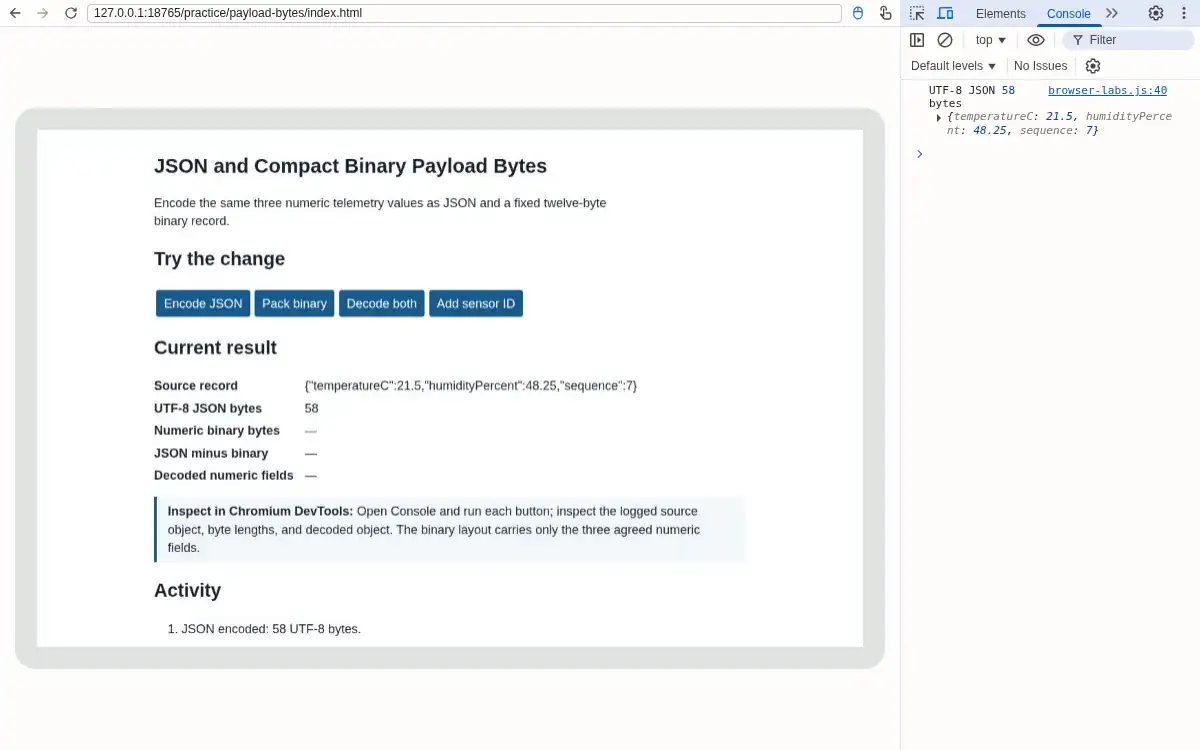
Step 2 · Browser (Chromium DevTools); numbered callout added to a real capture. Enlarge screenshot (new tab) Step 3
- Do
- In the controls panel, press Pack binary and inspect the Console Uint8Array and page byte count.
- You will see
- Input: DataView float32, float32, uint32 little-endian. Observed page: Source record: {"temperatureC":21.5,"humidityPercent":48.25,"sequence":7}; UTF-8 JSON bytes: 58; Numeric binary bytes: 12; JSON minus binary: 46; Decoded numeric fields: —. Observed DevTools: Console and page show 12 binary bytes; JSON minus binary is 46. Interpretation: The binary layout omits field names.
- Why it matters
- Evidence: Step 3 screenshot shows the real Chromium page and DevTools panel. Mechanism: Three four-byte fields create a fixed twelve-byte record. Boundary: A decoder must already know the schema. Next check: Decode both representations.
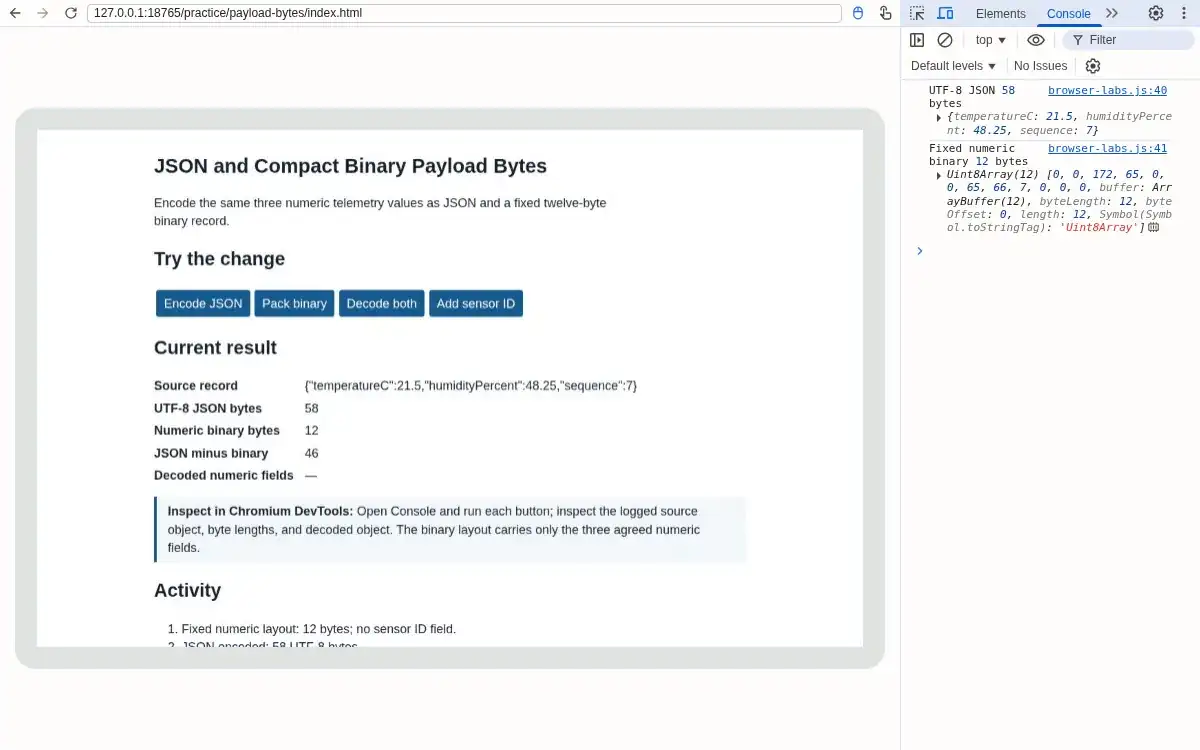
Step 3 · Browser (Chromium DevTools); numbered callout added to a real capture. Enlarge screenshot (new tab) Step 4
- Do
- In the controls panel, press Decode both and compare the Console decoded values.
- You will see
- Input: Decoded JSON and DataView. Observed page: Source record: {"temperatureC":21.5,"humidityPercent":48.25,"sequence":7}; UTF-8 JSON bytes: 58; Numeric binary bytes: 12; JSON minus binary: 46; Decoded numeric fields: {"temperatureC":21.5,"humidityPercent":48.25,"sequence":7}. Observed DevTools: Console reports numericEqual true; decoded values are 21.5, 48.25, and 7. Interpretation: The tested numeric fields round-trip in this fixture.
- Why it matters
- Evidence: Step 4 screenshot shows the real Chromium page and DevTools panel. Mechanism: The chosen float32 values are exactly representable here. Boundary: Other decimal values may lose float32 precision. Next check: Add one field to test schema change.
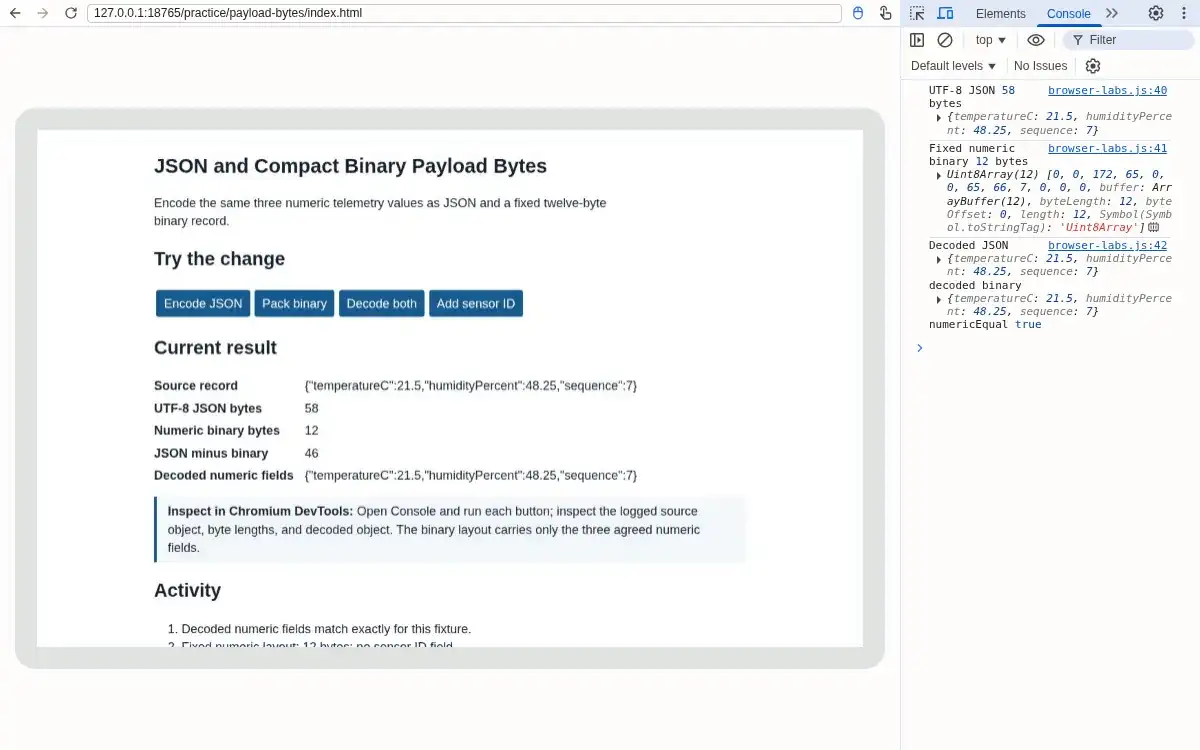
Step 4 · Browser (Chromium DevTools); numbered callout added to a real capture. Enlarge screenshot (new tab) Step 5
- Do
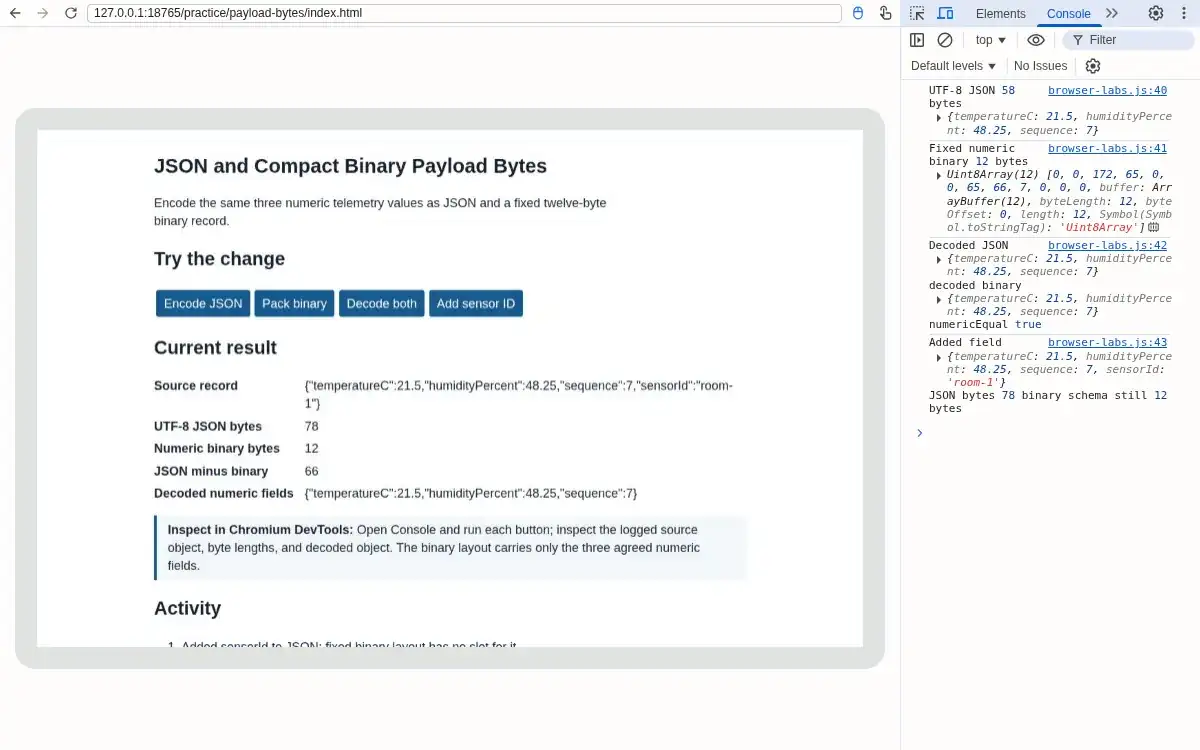
- In the controls panel, press Add sensor ID and compare the new JSON count with the unchanged binary count.
- You will see
- Input: Added sensorId room-1 to JSON. Observed page: Source record: {"temperatureC":21.5,"humidityPercent":48.25,"sequence":7,"sensorId":"room-1"}; UTF-8 JSON bytes: 78; Numeric binary bytes: 12; JSON minus binary: 66; Decoded numeric fields: {"temperatureC":21.5,"humidityPercent":48.25,"sequence":7}. Observed DevTools: JSON becomes 78 B, binary remains 12 B, difference 66 B. Interpretation: JSON carries the extra field; fixed binary has no slot for it.
- Why it matters
- Evidence: Step 5 screenshot shows the real Chromium page and DevTools panel. Mechanism: Field names and string content increase UTF-8 length. Boundary: A binary schema revision would be required to carry sensorId. Next check: Decode the numeric fields once more.
Step 5 · Browser (Chromium DevTools); numbered callout added to a real capture. Enlarge screenshot (new tab) Step 6
- Do
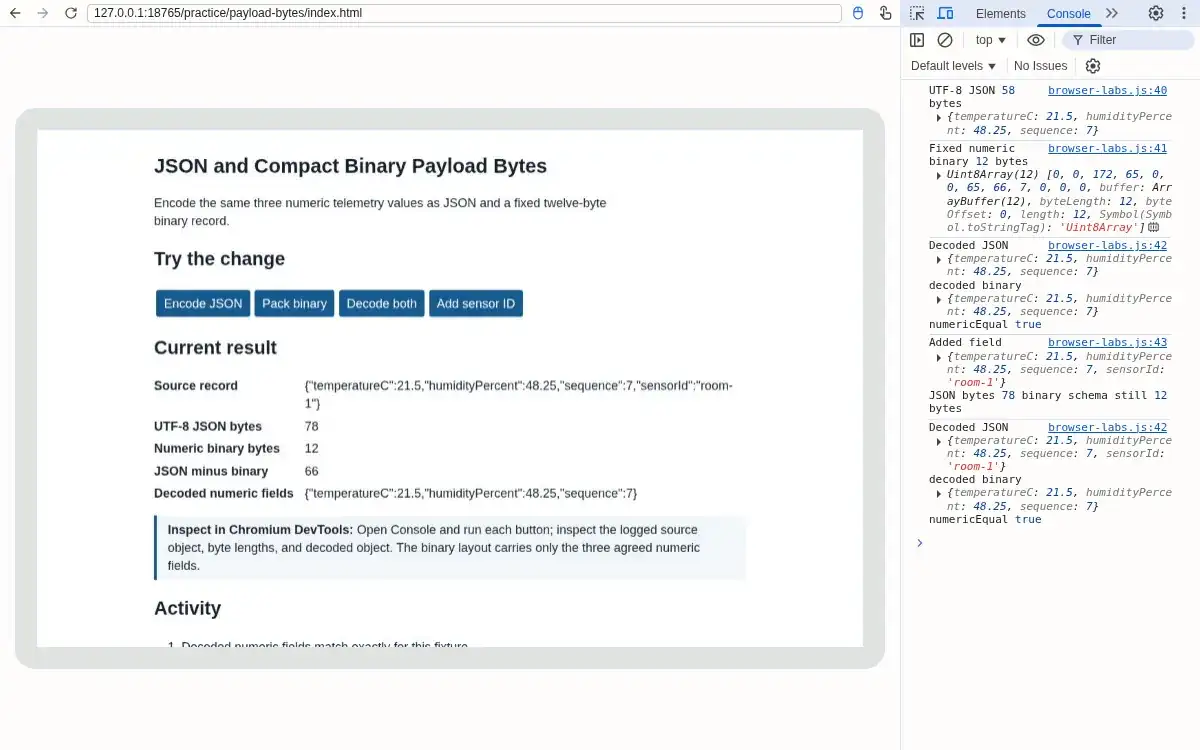
- Press Decode both and inspect the Console equality and field boundary.
- You will see
- Input: Decoded the extended JSON and original numeric layout. Observed page: Source record: {"temperatureC":21.5,"humidityPercent":48.25,"sequence":7,"sensorId":"room-1"}; UTF-8 JSON bytes: 78; Numeric binary bytes: 12; JSON minus binary: 66; Decoded numeric fields: {"temperatureC":21.5,"humidityPercent":48.25,"sequence":7}. Observed DevTools: Console reports numericEqual true for the three numeric fields; JSON also contains sensorId. Interpretation: Numeric equality does not mean the binary record preserves every field.
- Why it matters
- Evidence: Step 6 screenshot shows the real Chromium page and DevTools panel. Mechanism: The comparison separates byte economy from schema completeness. Boundary: This is not a CBOR or Protobuf benchmark. Next check: Use an agreed schema before choosing compact transport.
Step 6 · Browser (Chromium DevTools); numbered callout added to a real capture. Enlarge screenshot (new tab)
Chapter checks
These questions refer to the chapter’s examples. Use the return links to review their answers.
A sensor's application body shrinks from JSON at 95 bytes to CBOR at 50 bytes. What can you conclude before calculating the selected radio profile and complete packet?
Return to the chapter’s knowledge checkBoth endpoints support JSON and CBOR. For this specified four-field sensor record, the example encodings are 66 B as JSON and 52 B as CBOR. If the release goal is the smaller structured payload while retaining all four fields, which format fits?
Return to the chapter’s knowledge check
Return to REST APIs: Payload and Resource Design · Browse Labs