Optimistic UI and Failed Acknowledgement
Make a simulated door state recoverable by separating an optimistic display from server acknowledgement.

The Interfaces, Location and Privacy guide asks learners to make state and control accessible and recoverable. On iotclass.org a service worker in this lab folder plays the server; nothing leaves your browser.
Predict the reading, then compare it with the measurement.
Browser (Chromium DevTools)
Phone browserMake a simulated door state recoverable by separating an optimistic display from server acknowledgement.
Open the browser lab, then inspect the real Network, Console, or Accessibility panel in DevTools.
Open the phone lab (new tab)Steps
Step 1
- Do
- In the Network panel press Read server state and inspect the initial GET row.
- You will see
- Input: GET simulated door state. Observed page: Displayed door state: closed; Acknowledgement: Server confirms closed. Observed DevTools: HTTP 200 returns closed; page says Server confirms closed. Interpretation: The displayed baseline agrees with the service-worker fixture.
- Why it matters
- Evidence: Step 1 screenshot shows the real Chromium page and DevTools panel. Mechanism: The page reads the local state endpoint before a command. Boundary: The endpoint is a synthetic fixture, not a garage door. Next check: Send an optimistic change.
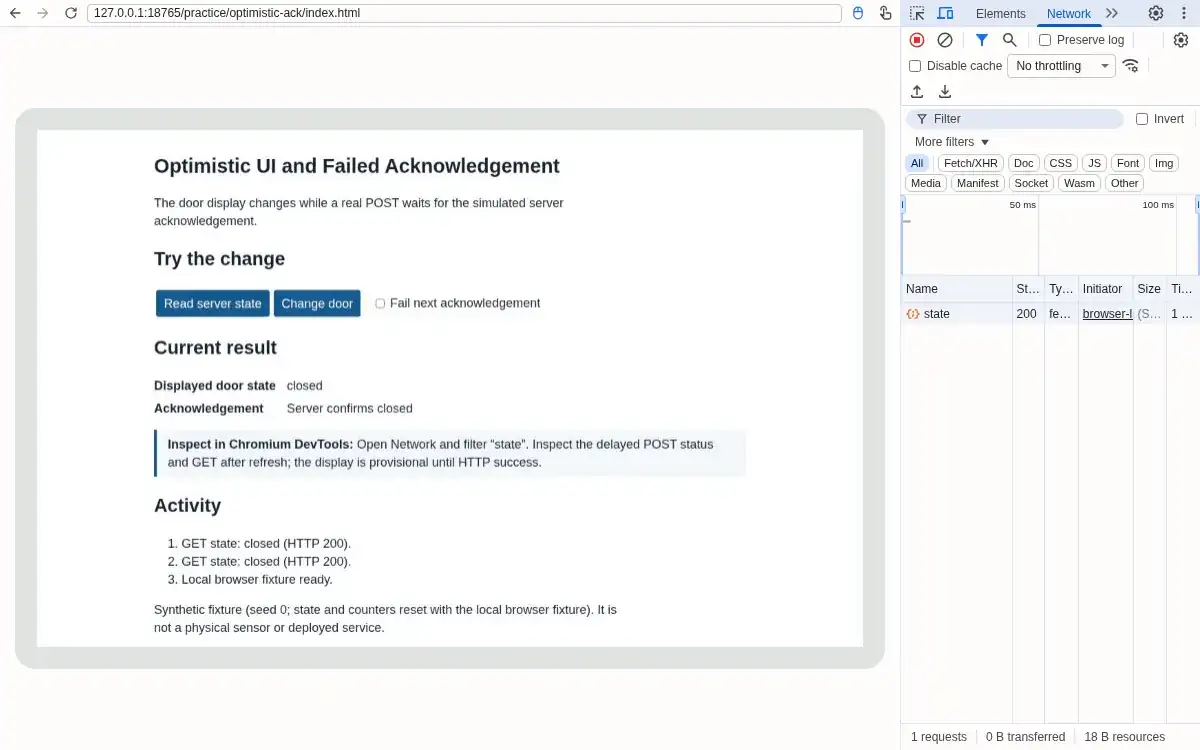
Step 1 · Browser (Chromium DevTools); numbered callout added to a real capture. Enlarge screenshot (new tab) Step 2
- Do
- Press Change door and watch the Current result panel while the POST is pending.
- You will see
- Input: Requested open with delayed acknowledgement. Observed page: Displayed door state: open; Acknowledgement: Pending open acknowledgement. Observed DevTools: The page shows open and Pending open acknowledgement; Network shows POST pending. Interpretation: The displayed state is provisional.
- Why it matters
- Evidence: Step 2 screenshot shows the real Chromium page and DevTools panel. Mechanism: The UI moves immediately while the HTTP request remains in flight. Boundary: The door is not yet confirmed open. Next check: Wait for the POST response.
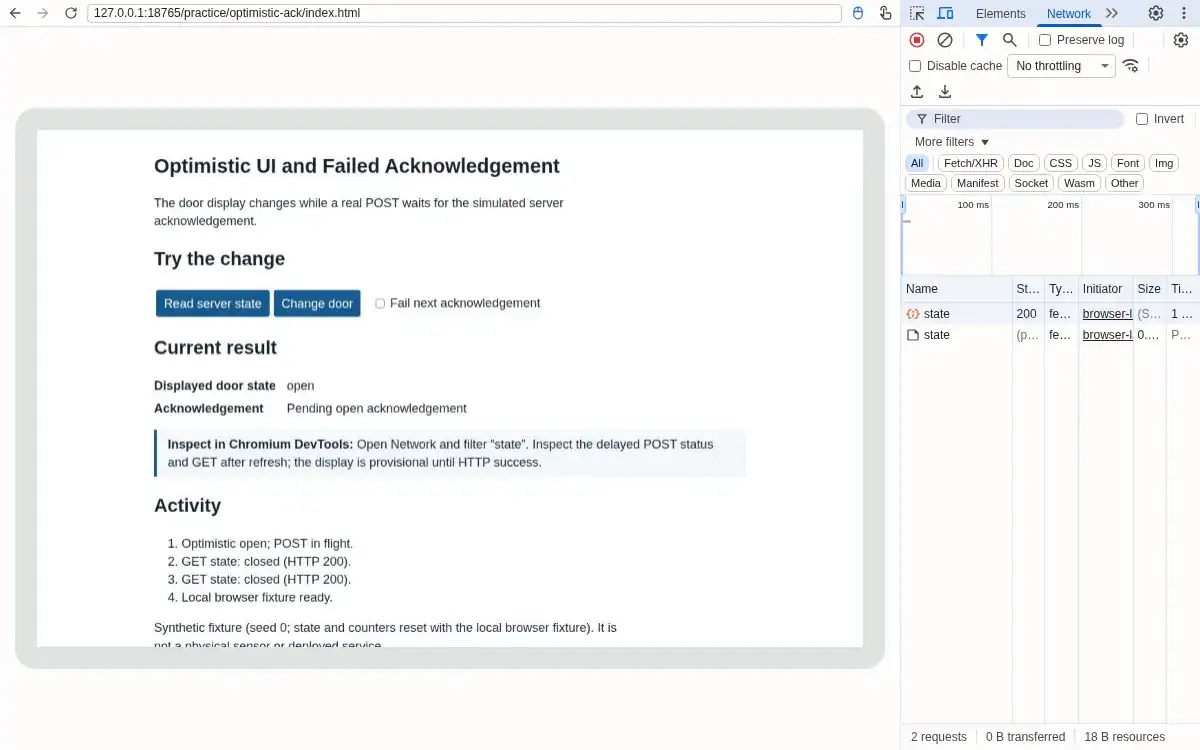
Step 2 · Browser (Chromium DevTools); numbered callout added to a real capture. Enlarge screenshot (new tab) Step 3
- Do
- In the Network panel wait for the delayed POST success response.
- You will see
- Input: Allowed the 1200 ms success response. Observed page: Displayed door state: open; Acknowledgement: Server confirms open. Observed DevTools: POST HTTP 200 after about 1.2 s; page says Server confirms open. Interpretation: Confirmed state catches up to optimistic display.
- Why it matters
- Evidence: Step 3 screenshot shows the real Chromium page and DevTools panel. Mechanism: Only the successful response updates fixture state. Boundary: A browser response is still not physical actuator feedback. Next check: Repeat with an acknowledgement failure.
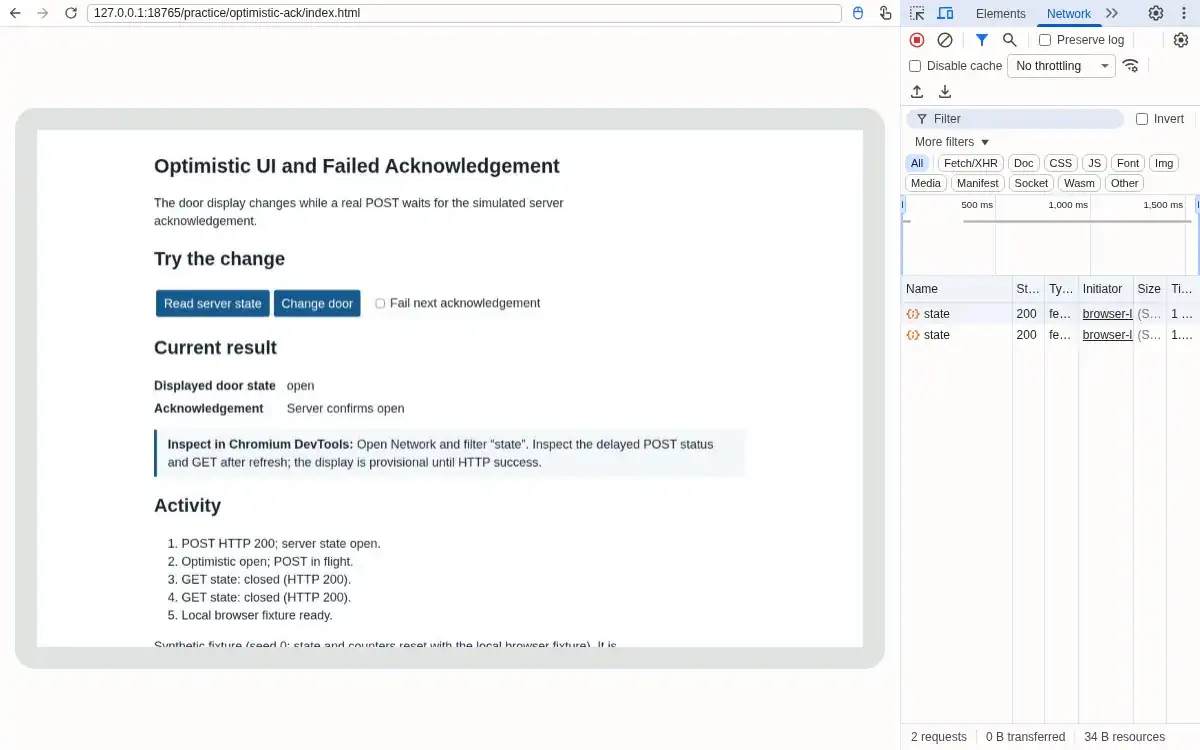
Step 3 · Browser (Chromium DevTools); numbered callout added to a real capture. Enlarge screenshot (new tab) Step 4
- Do
- In the controls panel, tick Fail next acknowledgement and press Change door; inspect the red Network row.
- You will see
- Input: Failed attempted close. Observed page: Displayed door state: open; Acknowledgement: Request failed (HTTP 503); restored open. Observed DevTools: POST returns HTTP 503; page restores open and names the failure. Interpretation: The optimistic close does not overwrite confirmed open.
- Why it matters
- Evidence: Step 4 screenshot shows the real Chromium page and DevTools panel. Mechanism: Failure response preserves the prior server state. Boundary: The error was deliberately generated by the scoped service worker. Next check: Reload to verify durable fixture state.
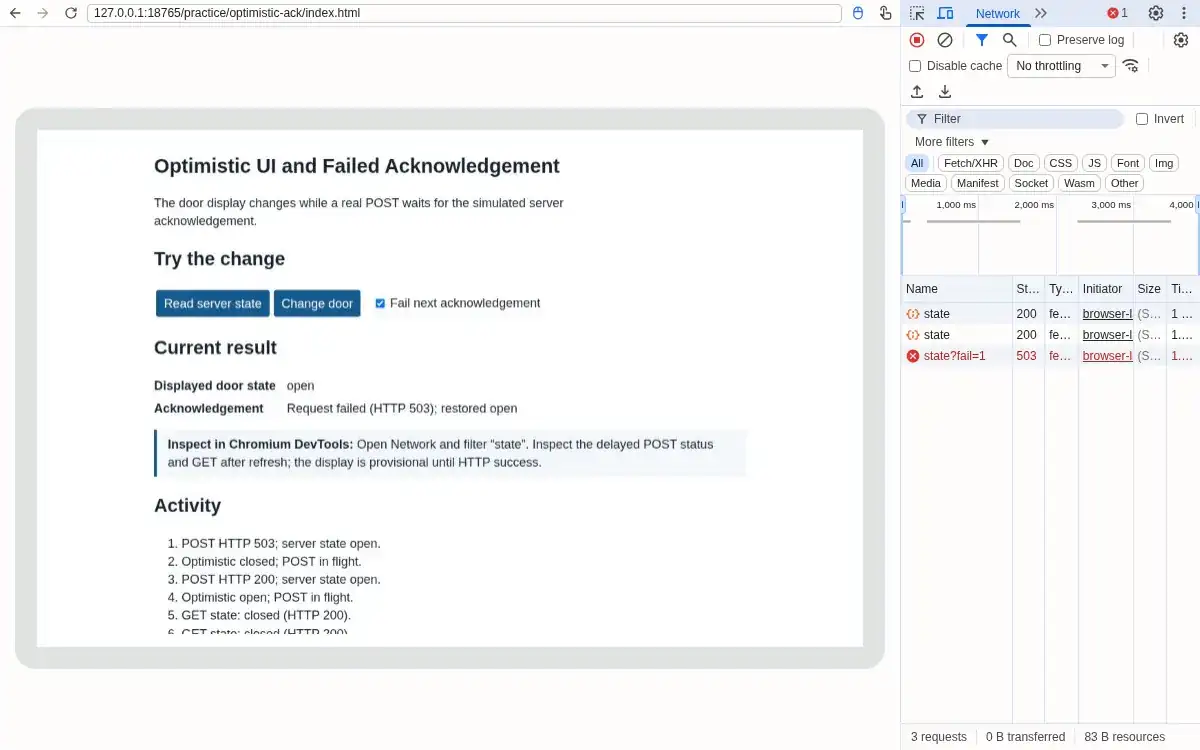
Step 4 · Browser (Chromium DevTools); numbered callout added to a real capture. Enlarge screenshot (new tab) Step 5
- Do
- In the browser toolbar, reload the browser page and inspect the new GET response.
- You will see
- Input: Reloaded after failed POST. Observed page: Displayed door state: open; Acknowledgement: Server confirms open. Observed DevTools: GET HTTP 200 returns open; page says Server confirms open. Interpretation: Refresh recovers the durable state.
- Why it matters
- Evidence: Step 5 screenshot shows the real Chromium page and DevTools panel. Mechanism: The browser rereads fixture state rather than trusting old display state. Boundary: Local server memory resets on process restart. Next check: Preserve both success and failure rows.
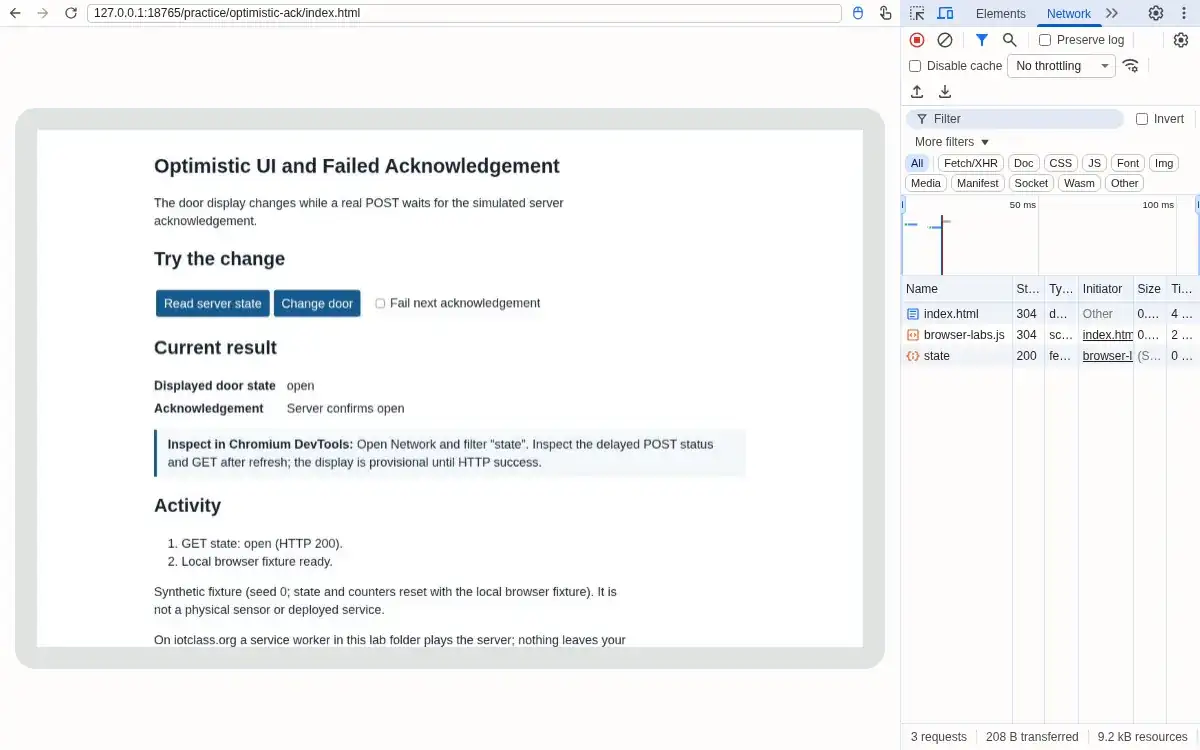
Step 5 · Browser (Chromium DevTools); numbered callout added to a real capture. Enlarge screenshot (new tab) Step 6
- Do
- In the Network panel compare GET, successful POST, failed POST, and reload evidence.
- You will see
- Input: Reviewed the captured request sequence. Observed page: Displayed door state: open; Acknowledgement: Server confirms open. Observed DevTools: Initial closed, pending open, HTTP 200 open, HTTP 503 close failure, final GET open. Interpretation: Optimism and acknowledgement remain distinguishable.
- Why it matters
- Evidence: Step 6 screenshot shows the real Chromium page and DevTools panel. Mechanism: The response codes and UI messages agree with scoped service worker state. Boundary: No physical door motion was tested. Next check: Use explicit pending and rollback states in real designs.
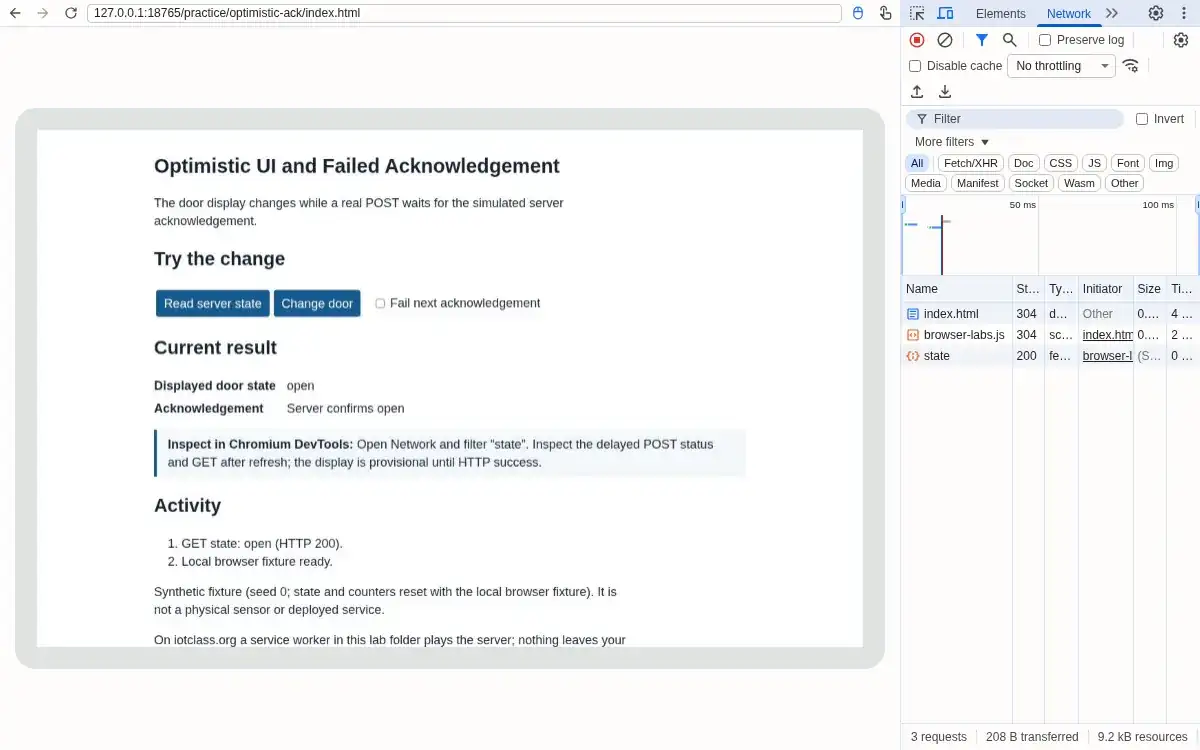
Step 6 · Browser (Chromium DevTools); numbered callout added to a real capture. Enlarge screenshot (new tab)
Chapter checks
These questions refer to the chapter’s examples. Use the return links to review their answers.
A remote device has not yet acknowledged an app command. Which interface behavior fits the chapter?
Return to the chapter’s knowledge checkYour smart thermostat app experiences 3-second network latency when sending temperature adjustment commands. Users repeatedly tap the increase button, thinking it's not working, resulting in the temperature jumping 10 degrees higher than intended. What interaction pattern would prevent this?
Return to the chapter’s knowledge check
Return to Interaction Patterns: Synchronization and Recovery · Browse Labs