Missing-value repair and false trends
Apply imputation strategies by sensor type and compare forward-fill choices.

Apply imputation strategies by sensor type and compare forward-fill choices.
Predict the reading, then compare it with the measurement.
Python 3 in your browser (JupyterLite)
Python · no installApply imputation strategies by sensor type and compare forward-fill choices.
Open the notebook in your browser and run each Python cell; no install or account is needed.
Three ways to run: use JupyterLite here with no install; run main.py locally from the downloadable lab folder; or open the same notebook in Google Colab.
Steps
Step 1
- Do
- Run the Step 1 notebook cell and inspect the timestamped missing markers.
- You will see
- SYNTHETIC minute-resolution temperature; seed=808; no random draws; minute value_C; 0 20.0; 1 21.0; 2 MISSING
- Why it matters
- An absent record must stay distinguishable from zero.
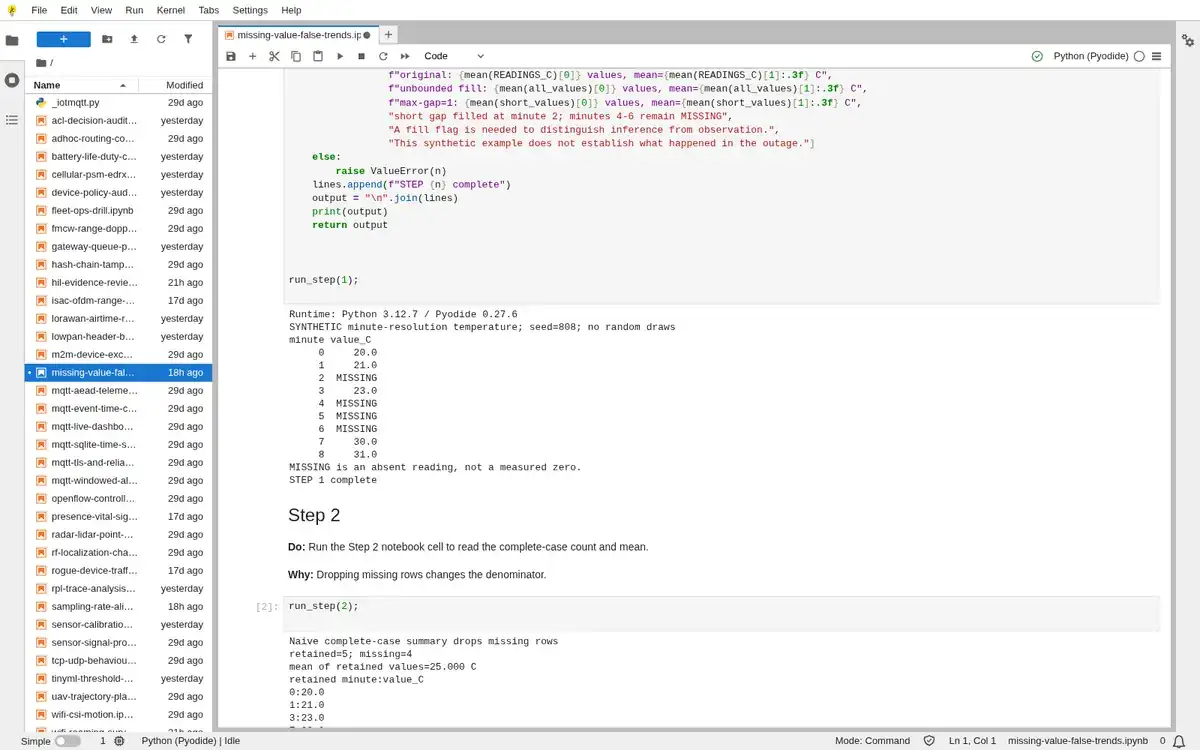
Step 1 · Python 3 in your browser (JupyterLite); numbered callout added to a real capture. Enlarge screenshot (new tab) Step 2
- Do
- Run the Step 2 notebook cell to read the complete-case count and mean.
- You will see
- Naive complete-case summary drops missing rows; retained=5; missing=4; 8:31.0; This mean has no values for outage minutes.
- Why it matters
- Dropping missing rows changes the denominator.
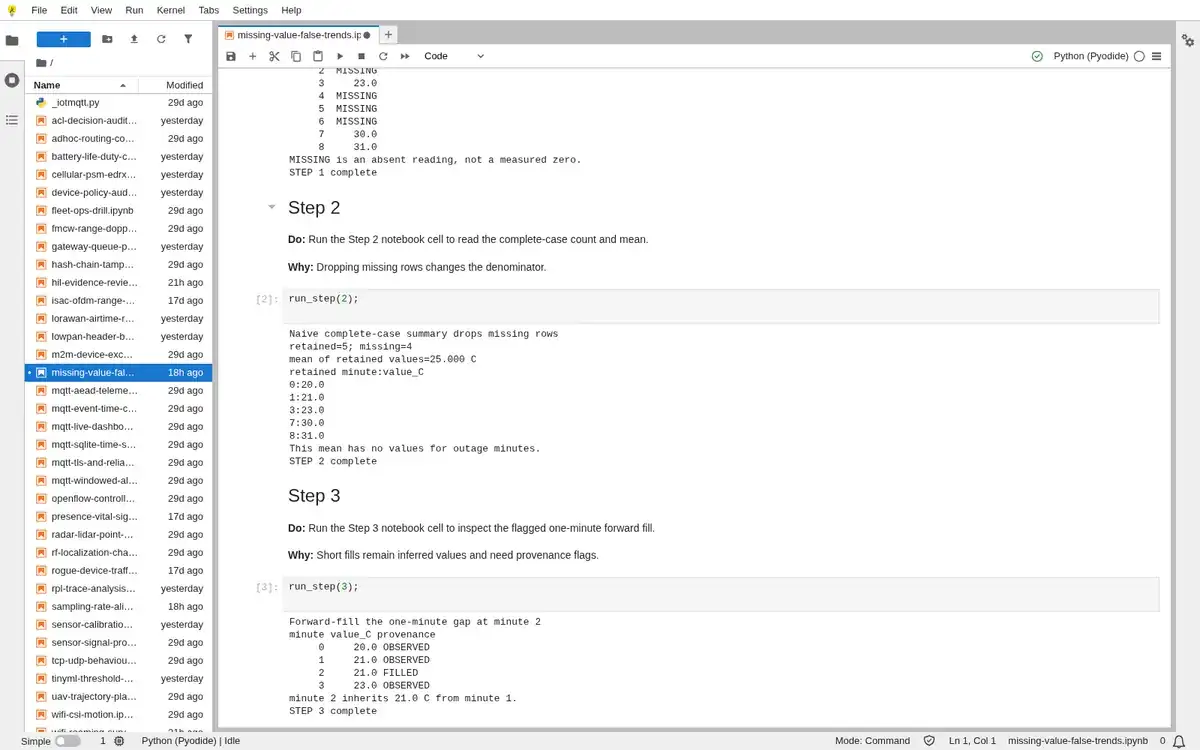
Step 2 · Python 3 in your browser (JupyterLite); numbered callout added to a real capture. Enlarge screenshot (new tab) Step 3
- Do
- Run the Step 3 notebook cell to inspect the flagged one-minute forward fill.
- You will see
- Forward-fill the one-minute gap at minute 2; minute value_C provenance; 3 23.0 OBSERVED; minute 2 inherits 21.0 C from minute 1.
- Why it matters
- Short fills remain inferred values and need provenance flags.
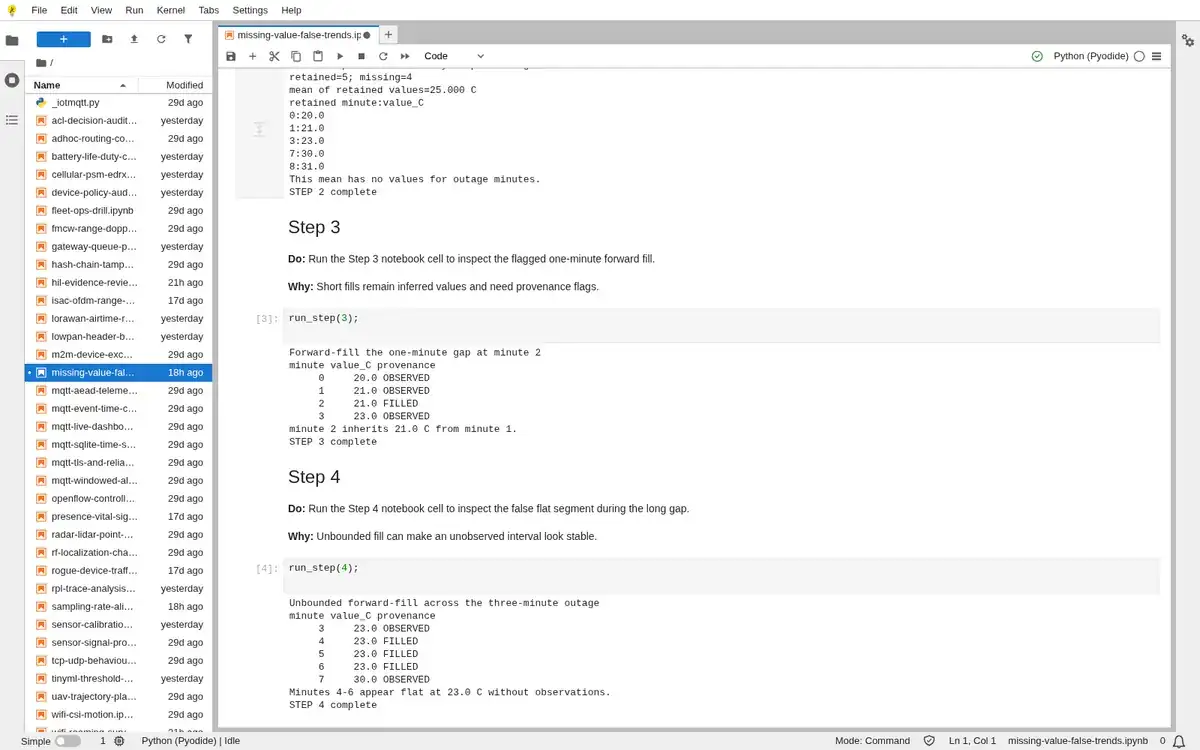
Step 3 · Python 3 in your browser (JupyterLite); numbered callout added to a real capture. Enlarge screenshot (new tab) Step 4
- Do
- Run the Step 4 notebook cell to inspect the false flat segment during the long gap.
- You will see
- Unbounded forward-fill across the three-minute outage; minute value_C provenance; 7 30.0 OBSERVED; Minutes 4-6 appear flat at 23.0 C without observations.
- Why it matters
- Unbounded fill can make an unobserved interval look stable.
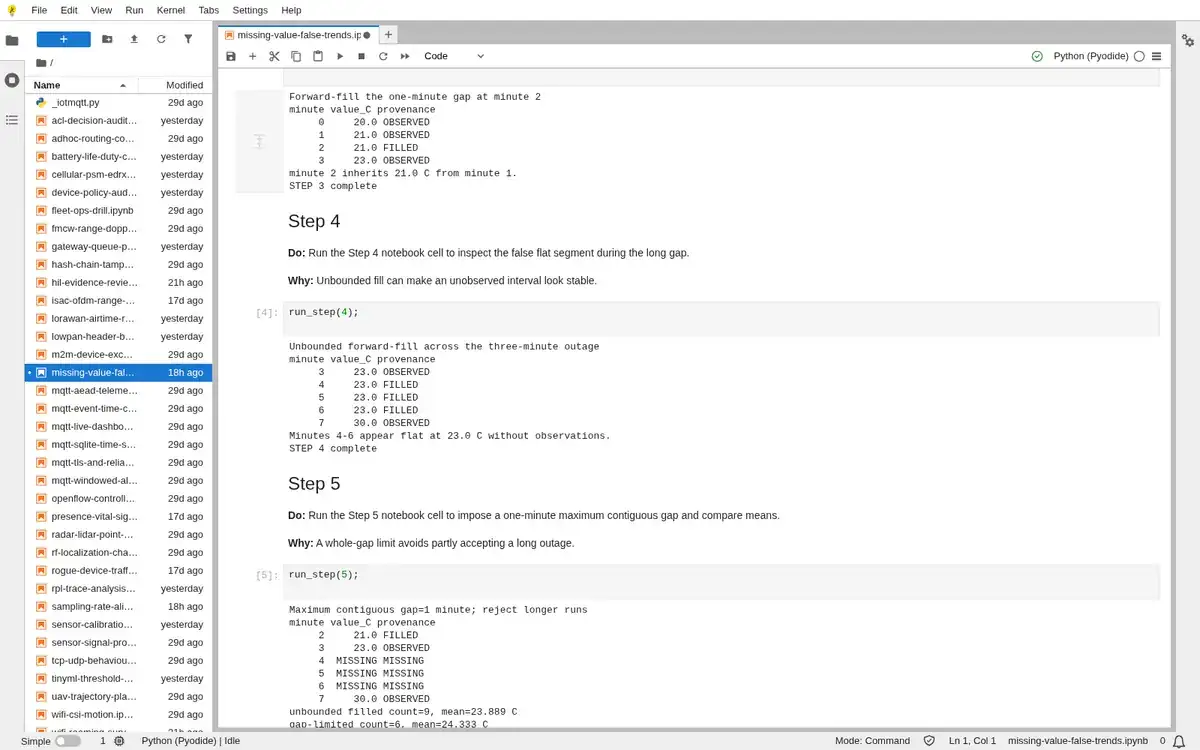
Step 4 · Python 3 in your browser (JupyterLite); numbered callout added to a real capture. Enlarge screenshot (new tab) Step 5
- Do
- Run the Step 5 notebook cell to impose a one-minute maximum contiguous gap and compare means.
- You will see
- Maximum contiguous gap=1 minute; reject longer runs; minute value_C provenance; unbounded filled count=9, mean=23.889 C; gap-limited count=6, mean=24.333 C
- Why it matters
- A whole-gap limit avoids partly accepting a long outage.
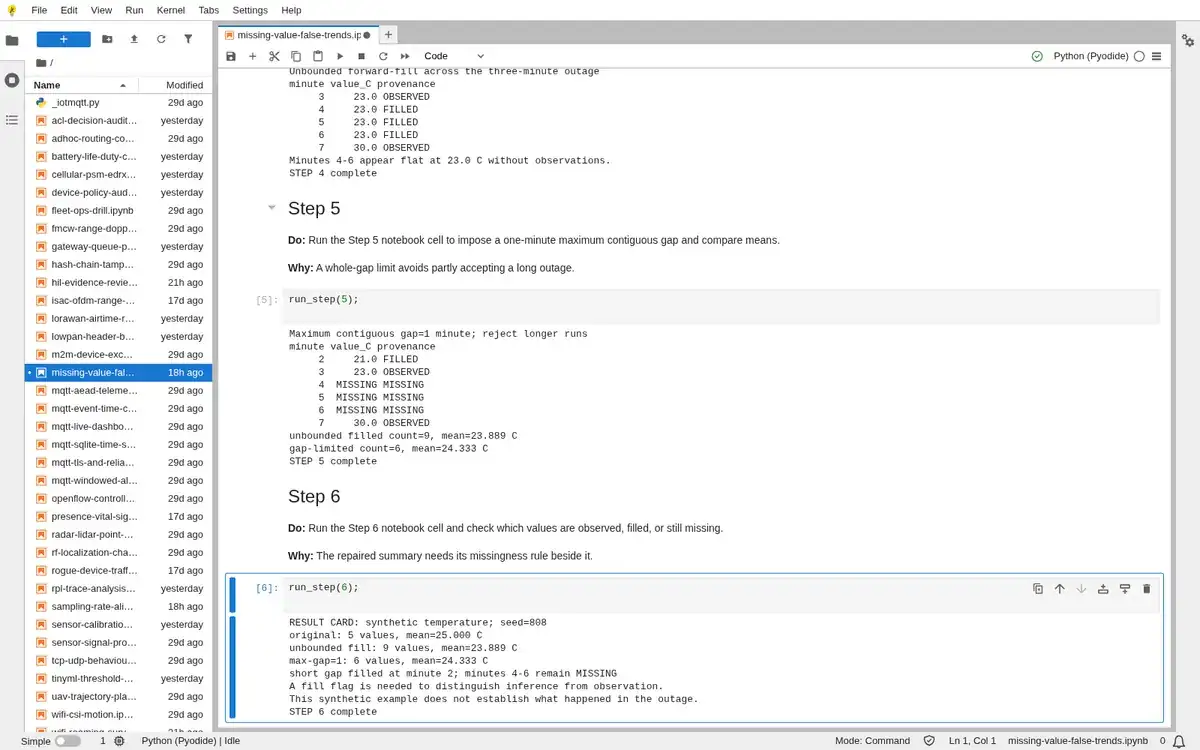
Step 5 · Python 3 in your browser (JupyterLite); numbered callout added to a real capture. Enlarge screenshot (new tab) Step 6
- Do
- Run the Step 6 notebook cell and check which values are observed, filled, or still missing.
- You will see
- RESULT CARD: synthetic temperature; seed=808; original: 5 values, mean=25.000 C; A fill flag is needed to distinguish inference from observation.; This synthetic example does not establish what happened in the outage.
- Why it matters
- The repaired summary needs its missingness rule beside it.
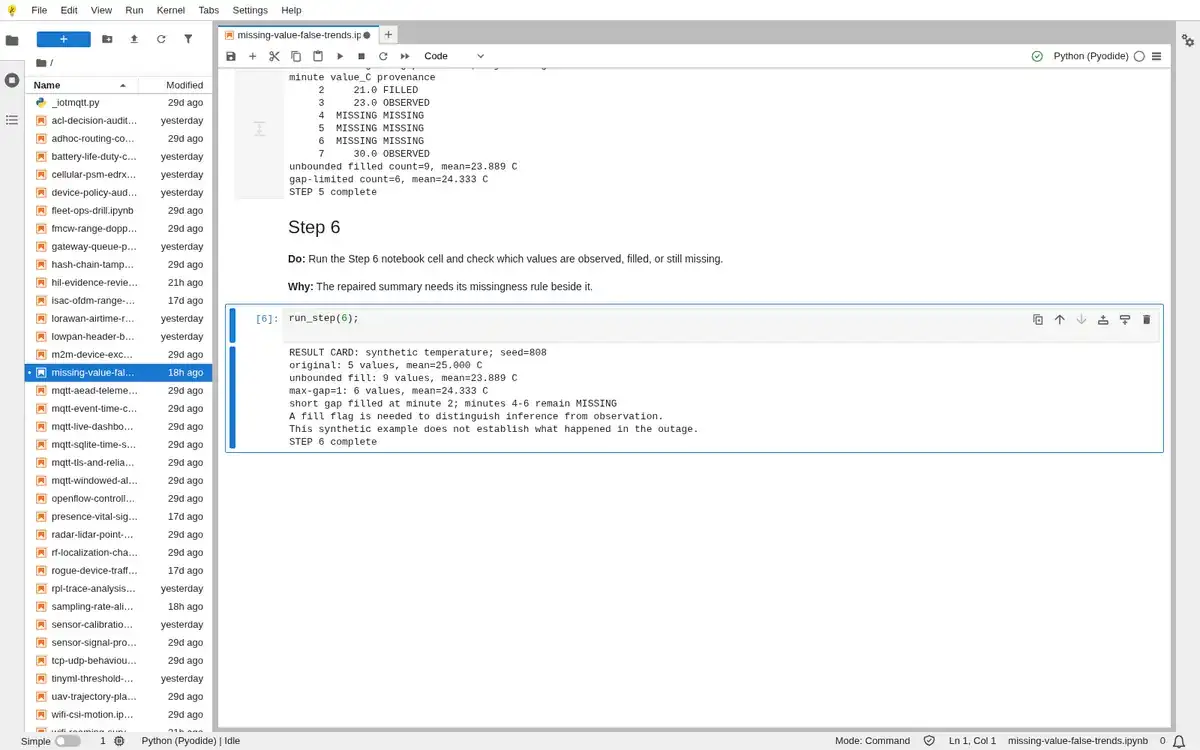
Step 6 · Python 3 in your browser (JupyterLite); numbered callout added to a real capture. Enlarge screenshot (new tab)
Chapter checks
These questions refer to the chapter’s examples. Use the return links to review their answers.
A PIR motion sensor loses 30 seconds of data during a brief network outage. What is the most appropriate imputation choice?
Return to the chapter’s knowledge checkA motion sensor (PIR) has 30 seconds of missing data due to a network outage. What is the most appropriate imputation strategy?
Return to the chapter’s knowledge check