Trace unicast and broadcast delivery
Trace the address and radio hop behind WSN communication patterns by comparing who receives one unicast and three broadcasts.

Trace the address, the route, and the hop that dropped a packet.
Predict the reading, then compare it with the measurement.
Contiki-NG Cooja
Third party ToolTrace the address and radio hop behind WSN communication patterns by comparing who receives one unicast and three broadcasts.
Download the complete lab packet and follow README.md to run it in the free simulator.
Download the setup and run guideGet the lab files
Download the complete packet for the simulation and its firmware, or download individual files for inspection. README.md gives the setup and run commands.
Steps
Step 1
- Do
- In Cooja Network, open the four-mote CSC and pause before the first send.
- You will see
- Run: seed 1; UDGM 50 m, four motes. Serial: `549000 ID:1 READY node=1 simulated-radio=UDGM` Serial: `971000 ID:4 READY node=4 simulated-radio=UDGM`
- Why it matters
- Meaning: The sender and three receivers are present before comparing delivery. Boundary: The positions define simulated reachability, not measured field range.
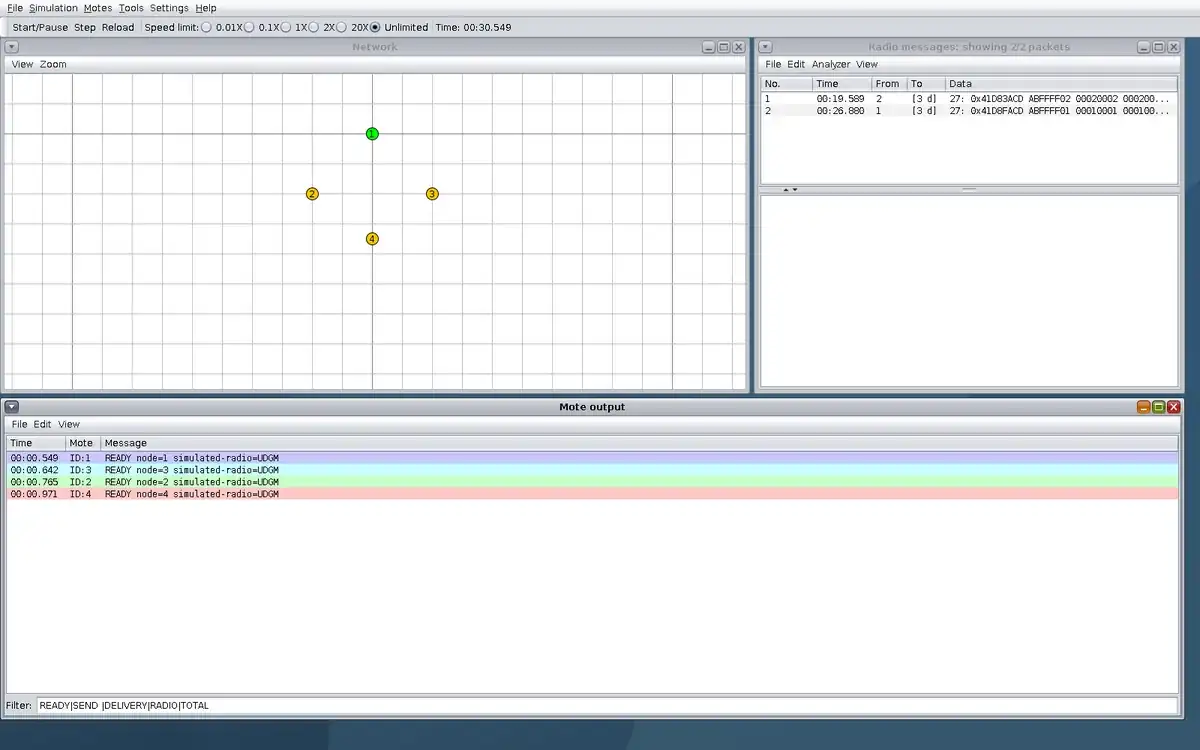
Step 1 · Contiki-NG Cooja; numbered callout added to a real capture. Enlarge screenshot (new tab) Step 2
- Do
- Click Start/Pause and inspect Mote output for the U1 send and receipt at 45 s.
- You will see
- Serial: `40550000 ID:1 SEND mode=unicast payload=U1 target=2` Serial: `40577120 ID:2 DELIVERY node=2 payload=U1 unicast_rx=1 broadcast_rx=0` Radio messages: 6 cumulative frames at the pause.
- Why it matters
- Meaning: The named unicast reached mote 2 only; no application receipt was logged at motes 3 or 4. Boundary: The frame total includes control traffic and is not a unicast cost in isolation.
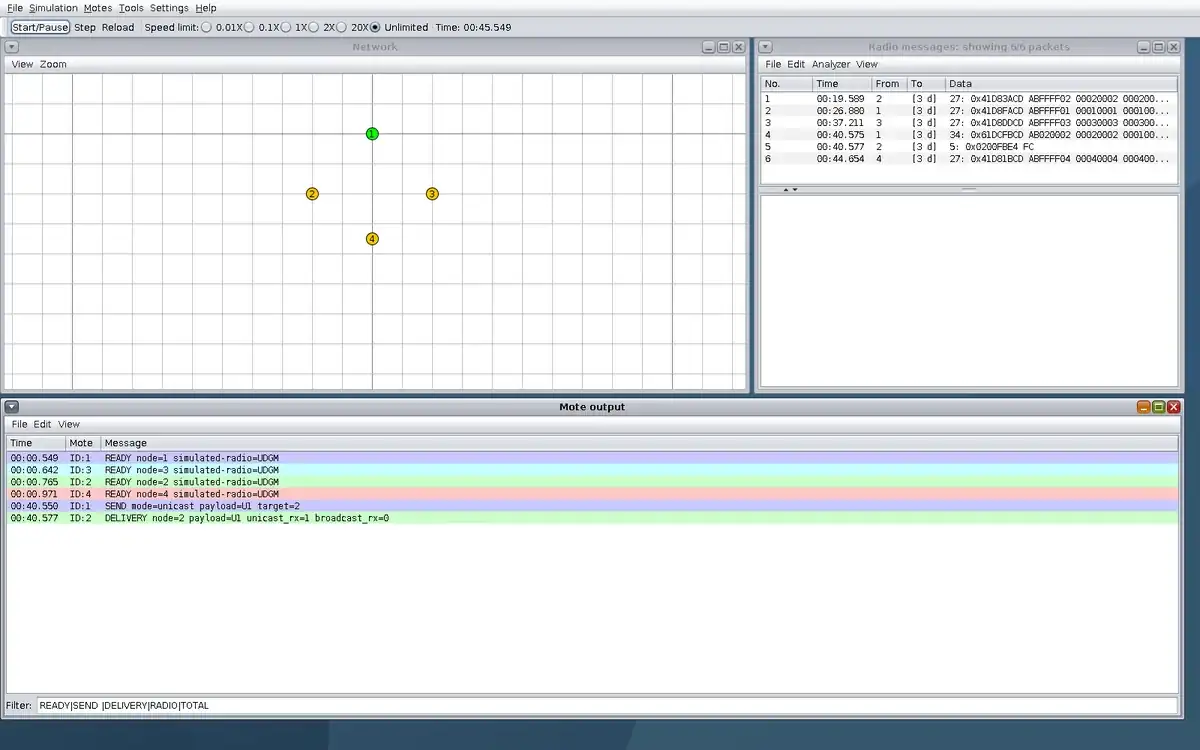
Step 2 · Contiki-NG Cooja; numbered callout added to a real capture. Enlarge screenshot (new tab) Step 3
- Do
- Click Start/Pause and inspect Mote output for the B1 receipts at 55 s.
- You will see
- Serial: `50551000 ID:1 SEND mode=broadcast payload=B1` Serial: `50582864 ID:2 DELIVERY node=2 payload=B1 unicast_rx=1 broadcast_rx=1` Serial: `50582864 ID:3 DELIVERY node=3 payload=B1 unicast_rx=0 broadcast_rx=1` Serial: `50582864 ID:4 DELIVERY node=4 payload=B1 unicast_rx=0 broadcast_rx=1`
- Why it matters
- Meaning: One multicast application send reached all three reachable receivers. Boundary: This seed-1 success is not a reliability estimate across interference conditions.
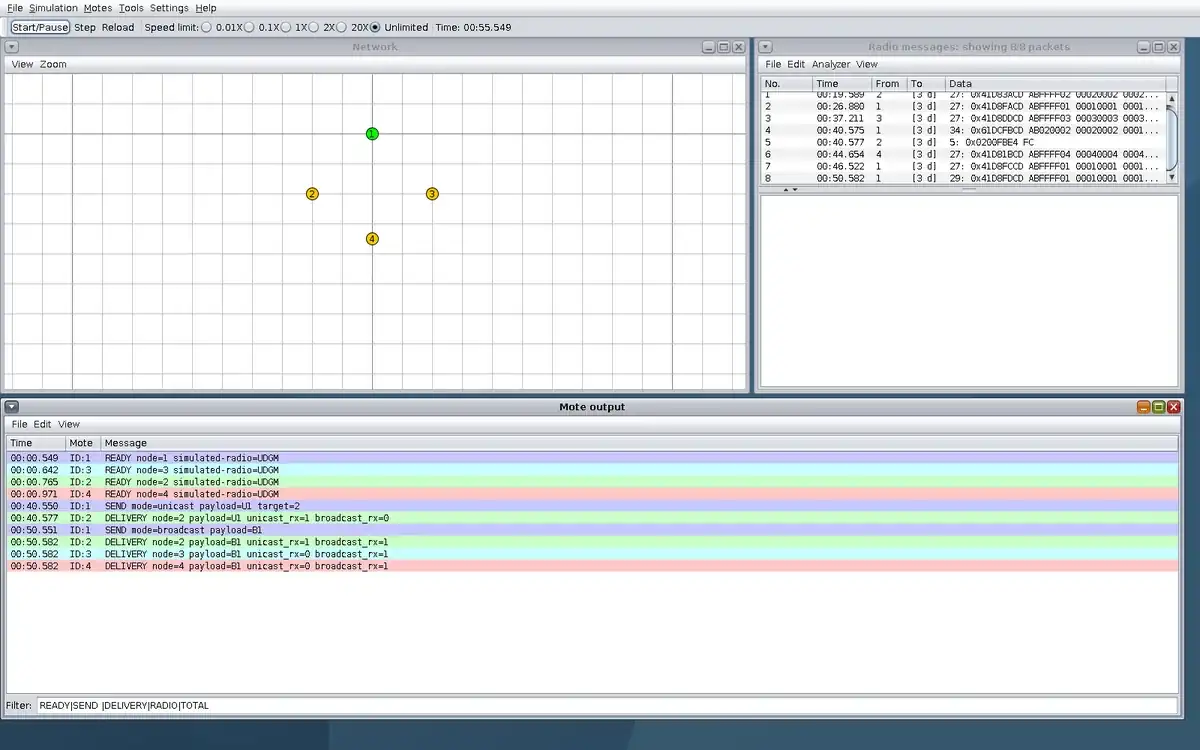
Step 3 · Contiki-NG Cooja; numbered callout added to a real capture. Enlarge screenshot (new tab) Step 4
- Do
- Click Start/Pause and compare the Radio messages list before and after B1; inspect mote 4 at 65 s.
- You will see
- Radio messages: 6 cumulative frames at 45 s, 8 at 55 s, 10 at 65 s. Serial: `60971000 ID:4 RADIO node=4 state=off`
- Why it matters
- Meaning: The radio trace changes as the application traffic and control traffic occur; the receiver state change is logged. Boundary: The cumulative frame difference cannot be assigned wholly to B1.
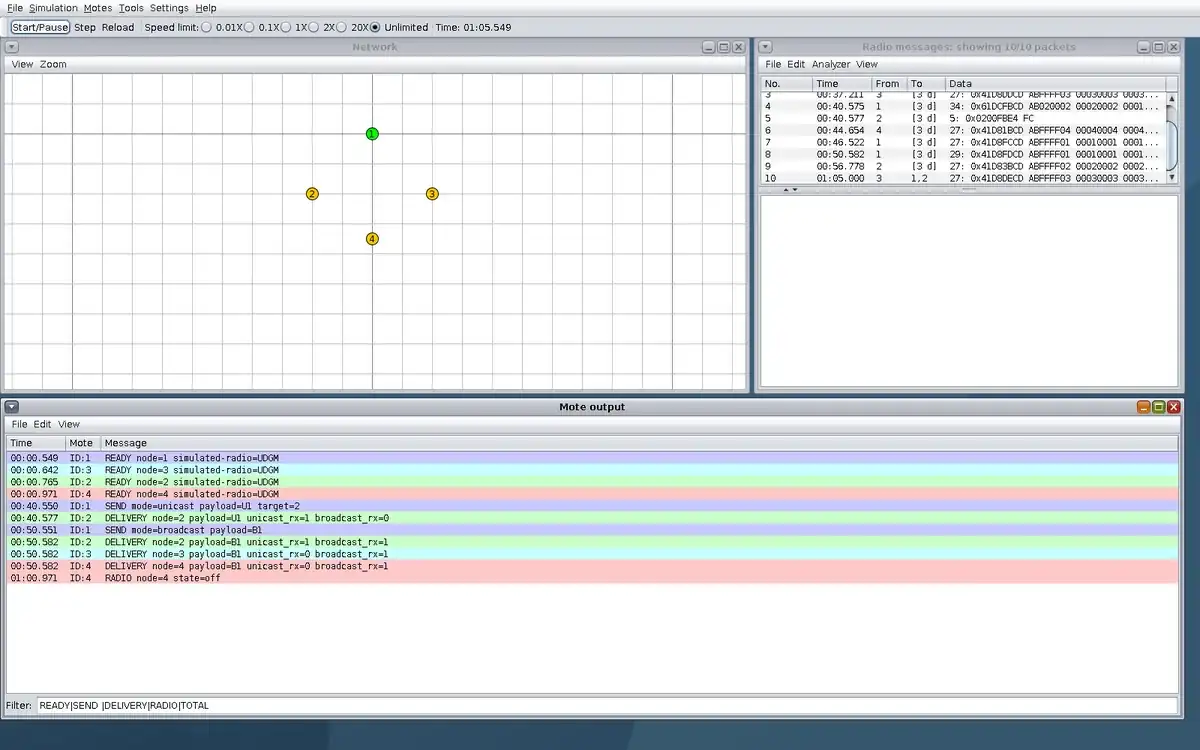
Step 4 · Contiki-NG Cooja; numbered callout added to a real capture. Enlarge screenshot (new tab) Step 5
- Do
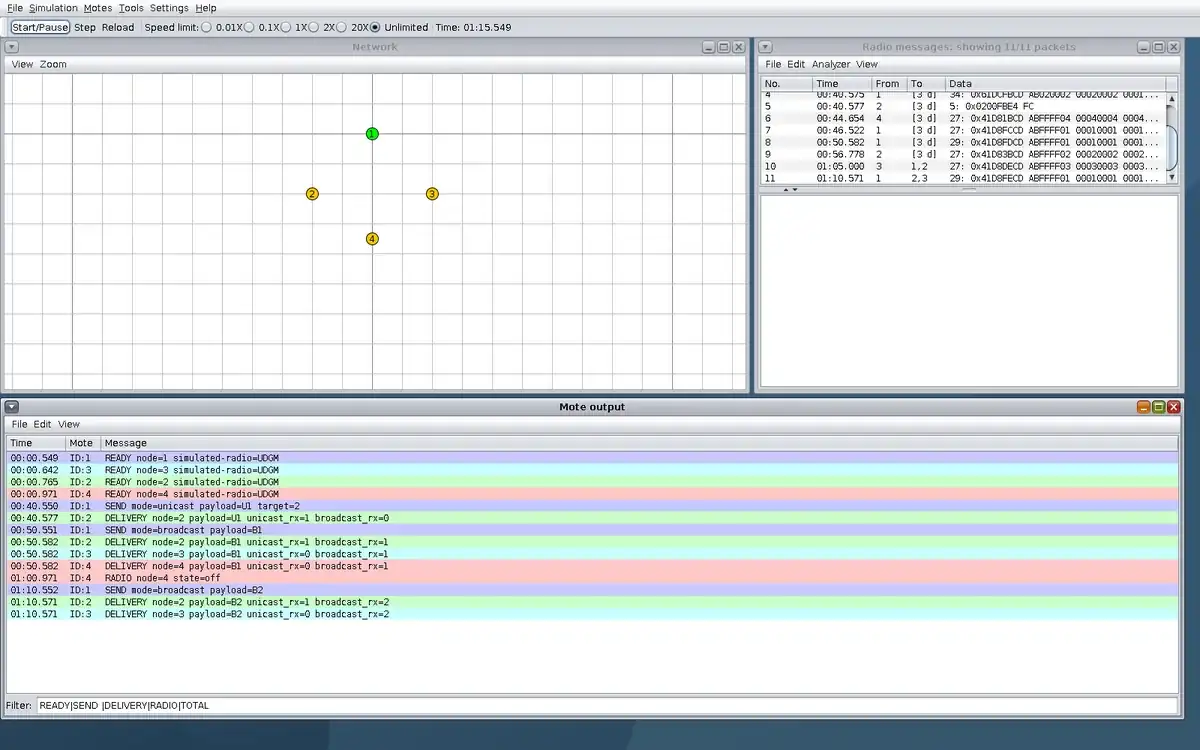
- Click Start/Pause and inspect Mote output for B2 while mote 4 is off.
- You will see
- Serial: `70552000 ID:1 SEND mode=broadcast payload=B2` Serial: `70571864 ID:2 DELIVERY node=2 payload=B2 unicast_rx=1 broadcast_rx=2` Serial: `70571864 ID:3 DELIVERY node=3 payload=B2 unicast_rx=0 broadcast_rx=2` Observed: no B2 receipt from mote 4; Radio messages shows 11 cumulative frames.
- Why it matters
- Meaning: The sender and two other receivers still operate while mote 4 cannot receive. Boundary: This isolates a deliberately disabled radio in the simulation, not a field fault diagnosis.
Step 5 · Contiki-NG Cooja; numbered callout added to a real capture. Enlarge screenshot (new tab) Step 6
- Do
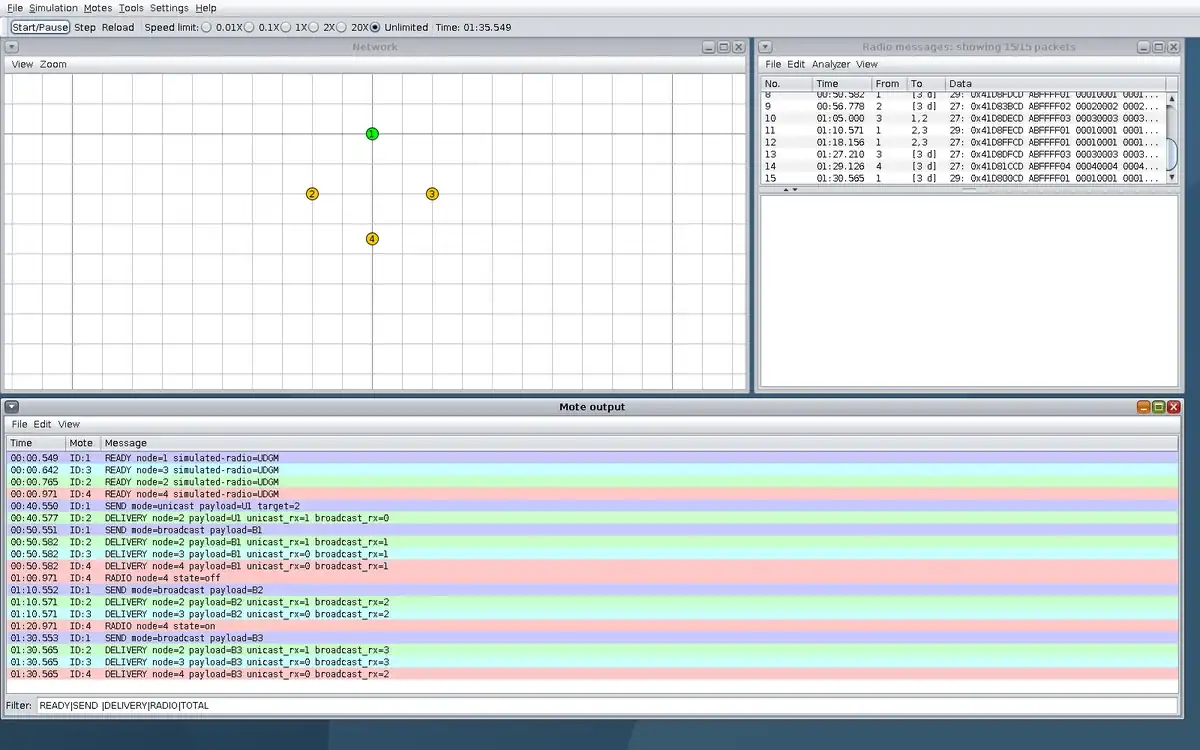
- Click Start/Pause and inspect Mote output after mote 4 returns and B3 is sent.
- You will see
- Serial: `80971000 ID:4 RADIO node=4 state=on` Serial: `90553000 ID:1 SEND mode=broadcast payload=B3` Serial: `90565864 ID:4 DELIVERY node=4 payload=B3 unicast_rx=0 broadcast_rx=2` Headless: `COUNTS U1=1 B1=3 B2=2 B3=3`; `TEST OK`.
- Why it matters
- Meaning: Delivery scope returns to all three receivers; the complete run supports the unicast and broadcast comparison. Boundary: Simulated radio and synthetic payloads do not establish hardware energy or outdoor coverage.
Step 6 · Contiki-NG Cooja; numbered callout added to a real capture. Enlarge screenshot (new tab)
Chapter checks
These questions refer to the chapter’s examples. Use the return links to review their answers.
A team starts a WSN architecture review by choosing mesh because it sounds reliable. What should the review require first?
Return to the chapter’s knowledge checkA greenhouse WSN architecture was approved for slow temperature and humidity trends. The team now wants to reuse it for immediate fire alarm response. What should happen?
Return to the chapter’s knowledge check