Request a temperature resource across a constrained mesh
What implementation evidence proves the CoAP server, client, and constrained link behave as expected?

Broker Bex: I want you to trace each request through the relay and confirm what the server actually received.
Predict the reading, then compare it with the measurement.
Contiki-NG Cooja
Third party ToolWhat implementation evidence proves the CoAP server, client, and constrained link behave as expected?
Download the complete lab packet and follow README.md to run it in the free simulator.
Download the setup and run guideGet the lab files
Download the complete packet for the simulation and its firmware, or download individual files for inspection. README.md gives the setup and run commands.
Steps
Step 1
- Do
- Open the CSC in Cooja. In the Network panel, identify server 1, relay 2, and client 3. In the Mote output panel, filter CLIENT|SERVER|RELAY and wait for the client route.
- You will see
- Server 1 starts /temperature at 21.5; relay 2 reports reachable=1 at 20.765 s. Client 3 reports root reachable via relay at 35.642 s. The motes sit at x=0,25,50 m with a 40 m radio range.
- Why it matters
- The client is 50 m from the server, so the relay is required for this path. These are positions and protocol output from a simulated radio run.
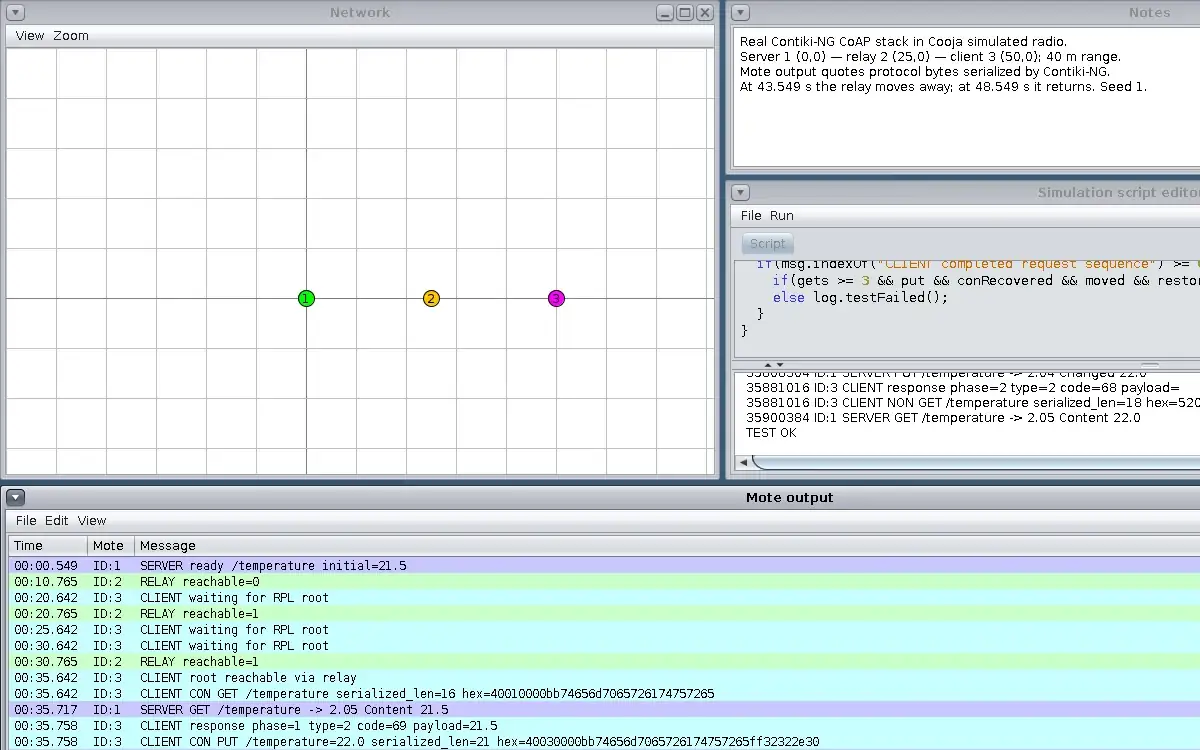
Step 1 · Contiki-NG Cooja; numbered callout added to a real capture. Enlarge screenshot (new tab) Step 2
- Do
- In the Mote output panel, find CLIENT CON GET and the next SERVER GET and CLIENT response rows. Read the URI-Path and the response value.
- You will see
- 35.642 s: CON GET serialized_len=16, hex=40010000bb74656d7065726174757265. 35.717 s: SERVER GET /temperature -> 2.05 Content 21.5. 35.758 s: CLIENT response phase=1 type=2 code=69 payload=21.5.
- Why it matters
- The Contiki-NG serializer produced these CoAP bytes before the send API set the final Message ID. Response code 69 is 2.05 Content; type 2 is ACK.
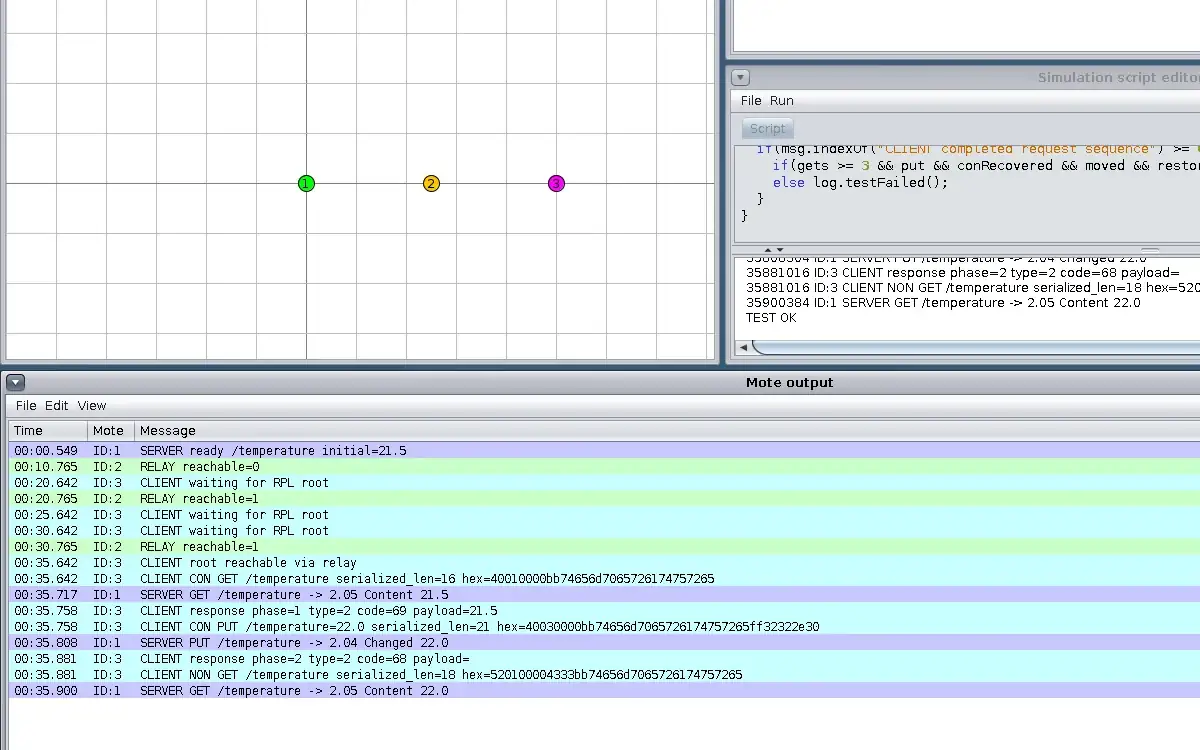
Step 2 · Contiki-NG Cooja; numbered callout added to a real capture. Enlarge screenshot (new tab) Step 3
- Do
- In the Mote output panel, read the CON PUT bytes, server change, and client response. Compare the new value with the first GET.
- You will see
- 35.758 s: CON PUT serialized_len=21, hex=40030000bb74656d7065726174757265ff32322e30. 35.808 s: SERVER PUT /temperature -> 2.04 Changed 22.0. 35.881 s: CLIENT response phase=2 type=2 code=68.
- Why it matters
- The ff payload marker precedes ASCII 22.0 in Contiki-NG serialization. Code 68 means 2.04 Changed, proving the server accepted the write.
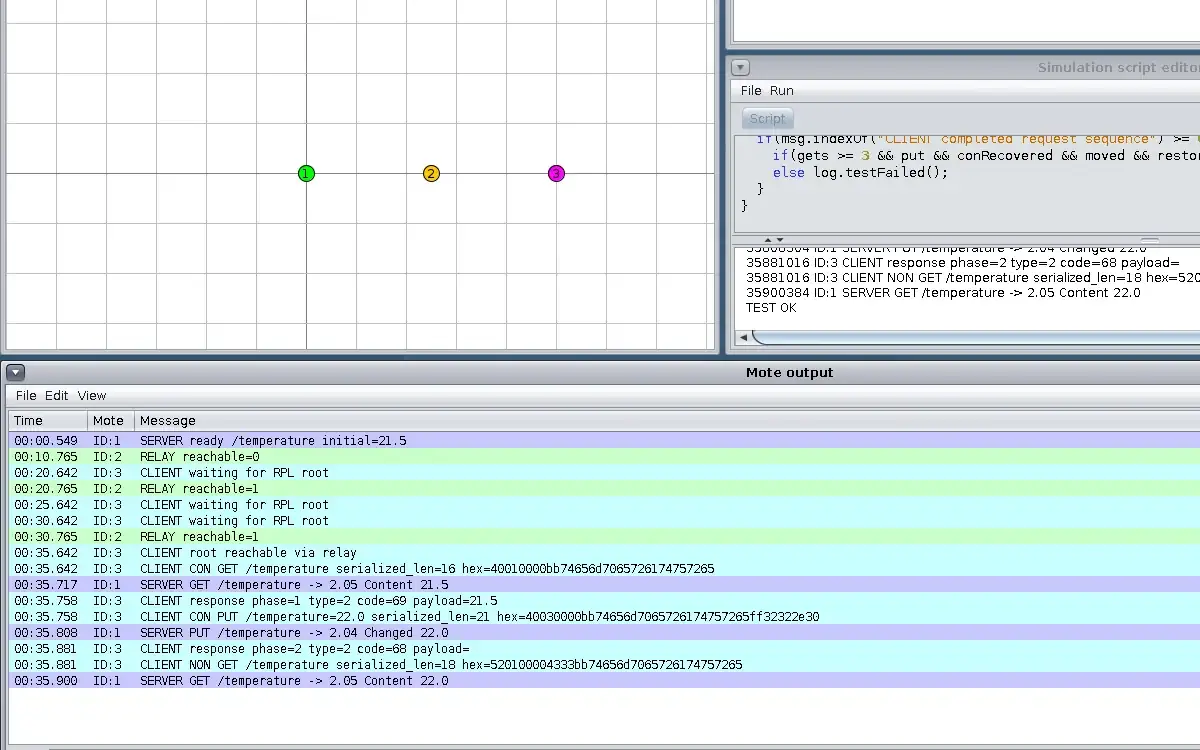
Step 3 · Contiki-NG Cooja; numbered callout added to a real capture. Enlarge screenshot (new tab) Step 4
- Do
- In the Mote output panel, find the baseline NON GET and the following server receipt. Compare its first byte and token with the CON GET.
- You will see
- 35.881 s: NON GET serialized_len=18, hex=520100004333bb74656d7065726174757265. 35.900 s: SERVER GET /temperature -> 2.05 Content 22.0. No client callback row followed this baseline NON request in this run.
- Why it matters
- The 52 header identifies a NON request with a 2-byte token; the server did receive it. Server receipt and client callback are distinct observations.
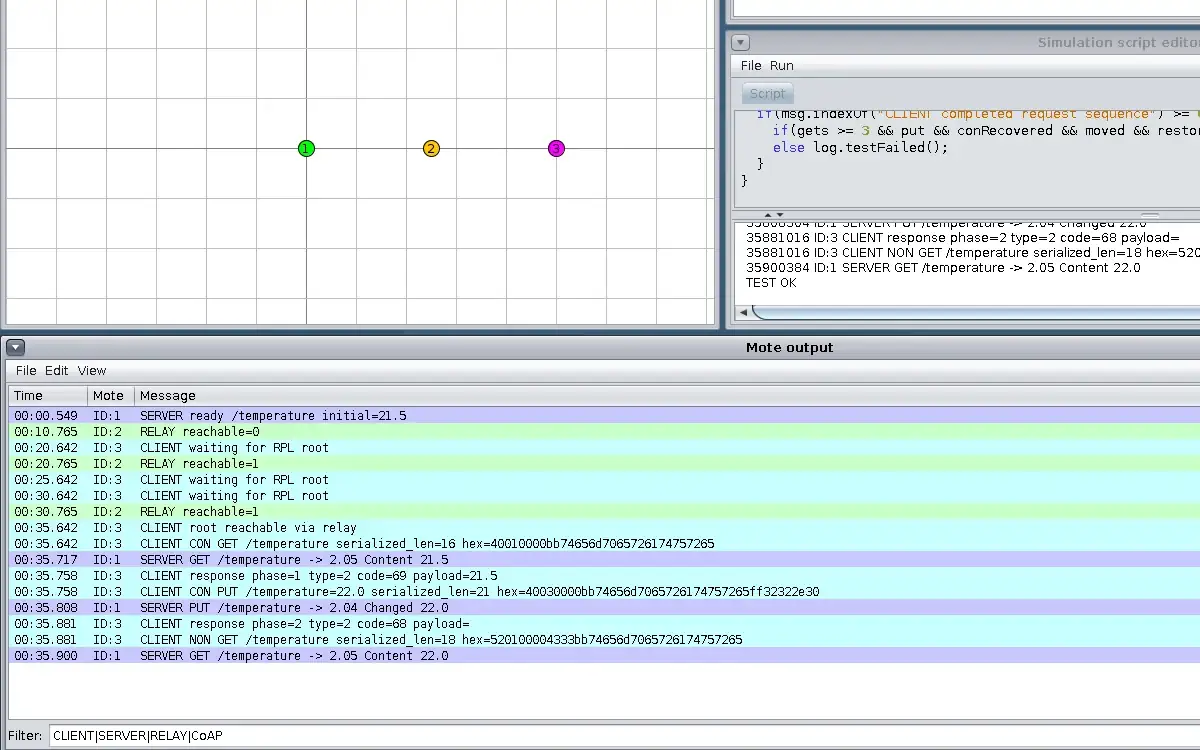
Step 4 · Contiki-NG Cooja; numbered callout added to a real capture. Enlarge screenshot (new tab) Step 5
- Do
- Read the ScriptRunner fault line and Network panel after relay 2 moves away. Find the client CON GET sent during the outage.
- You will see
- 43.549 s: FAULT relay 2 moved to (300,300). 45.882 s: CLIENT LOSS CON GET /temperature serialized_len=16. The captured Network pane shows only server 1 and client 3 within view.
- Why it matters
- The client has no direct 40 m link to the server while the relay is away. A request log alone does not prove delivery or a response.
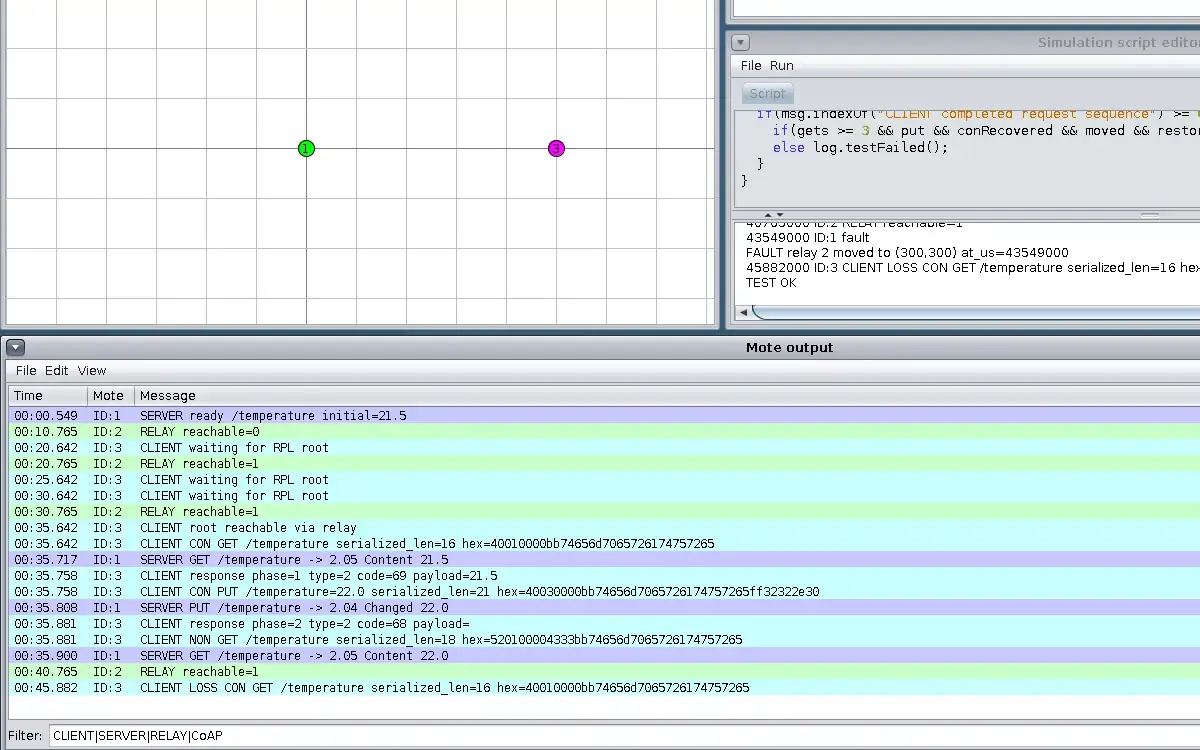
Step 5 · Contiki-NG Cooja; numbered callout added to a real capture. Enlarge screenshot (new tab) Step 6
- Do
- Let the CSC finish and in the Mote output panel inspect the restored CON exchange and final NON attempt. Check ScriptRunner panel for TEST OK and compare server receipts after each request.
- You will see
- 48.549 s: relay 2 restored to (25,0). 50.380 s: SERVER GET /temperature -> 2.05 Content 22.0. 50.399 s: CLIENT response phase=4 type=2 code=69 payload=22.0. 50.399 s: relay moved away before final NON GET; no later SERVER GET by 60.400 s.
- Why it matters
- The CON request at 45.882 s received a reply 4.517 s later, after the outage. The final NON has no server receipt in this bounded run; this is a measured outcome, not a universal guarantee.
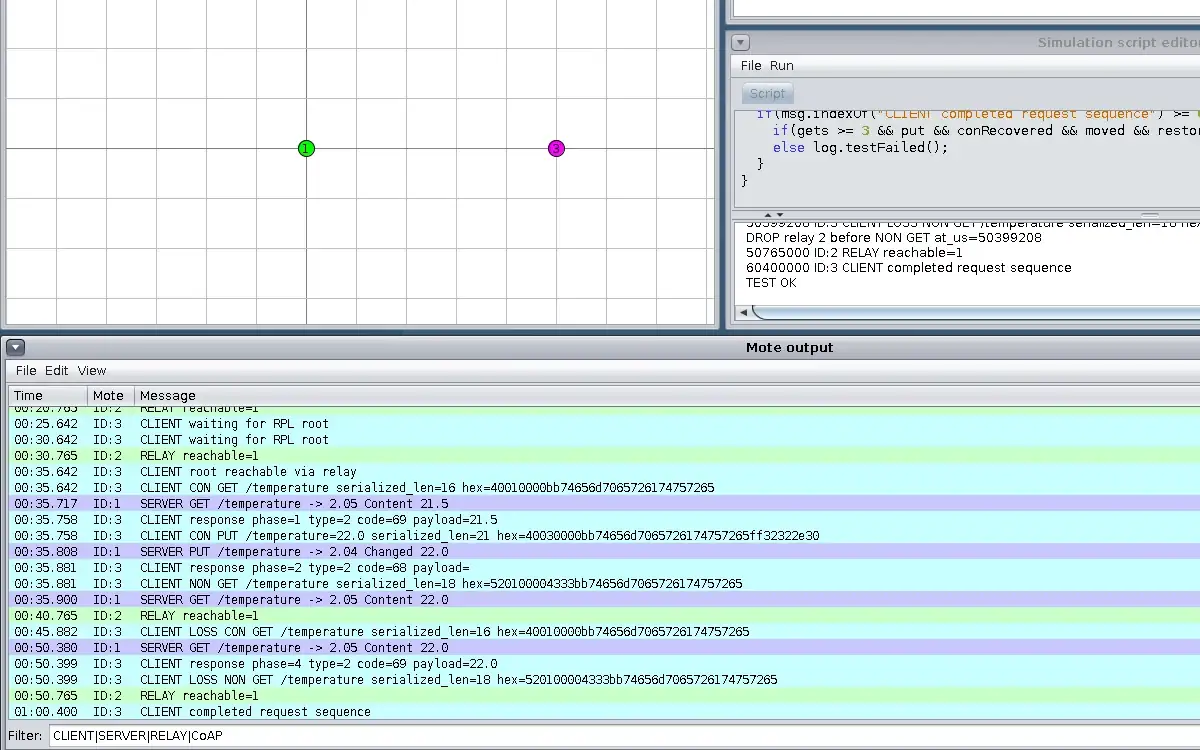
Step 6 · Contiki-NG Cooja; numbered callout added to a real capture. Enlarge screenshot (new tab)
Chapter checks
These questions refer to the chapter’s examples. Use the return links to review their answers.
Per this chapter's 'Putting Numbers to It' worked example, what are the total CoAP and HTTP message sizes for a single temperature-reading request/response exchange?
Return to the chapter’s knowledge checkWhich of the following CoAP method properties is correct?
Return to the chapter’s knowledge check