MQTT QoS Playground
Interactive Simulation of QoS Levels 0, 1, and 2 Under Various Network Conditions
MQTT QoS Playground
This interactive tool helps you understand MQTT Quality of Service (QoS) levels through hands-on simulation. Experiment with different network conditions and observe how each QoS level handles packet loss, latency, and connection drops.
Learning Objectives
By using this interactive tool, you will be able to:
- Visualize QoS handshakes: See the message exchange patterns for QoS 0, 1, and 2
- Understand reliability trade-offs: Experience how each level handles network failures
- Compare delivery guarantees: Use comparison mode to see all three levels side-by-side
- Identify appropriate QoS selection: Learn when to use each level based on requirements
- Analyze statistics: Track success rates, duplicates, and message ordering
The QoS Playground simulates MQTT message delivery under configurable network conditions:
- QoS Level Selection: Choose between QoS 0 (At Most Once), QoS 1 (At Least Once), or QoS 2 (Exactly Once)
- Network Condition Sliders: Configure packet loss percentage, latency, and connection drop probability
- Message Simulation: Send messages and watch the handshake flow in real-time
- Visual Flow Diagram: Animated visualization of PUBLISH, PUBACK, PUBREC, PUBREL, and PUBCOMP messages
- Statistics Panel: Track delivery success rate, duplicate messages, and ordering issues
- Comparison Mode: Run all three QoS levels simultaneously under identical conditions
- Select a QoS level using the tabs or comparison mode toggle
- Adjust network conditions with the sliders (packet loss, latency, connection drops)
- Click “Send Message” to simulate a message transmission
- Observe the handshake in the flow diagram panel
- Check statistics to see delivery outcomes over multiple messages
- Try pre-built scenarios to quickly test different network environments
- Use comparison mode to see how different QoS levels perform under the same conditions
Understanding MQTT QoS Levels
MQTT Quality of Service (QoS) defines the delivery guarantee between the sender and receiver. Each level trades off reliability against latency and network overhead.
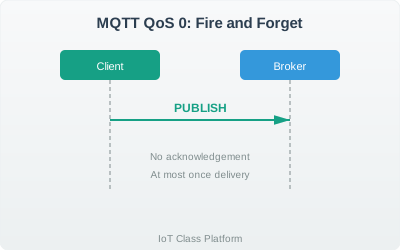
QoS 0: At Most Once (Fire and Forget)
Message Flow:
Behavior:
- Message sent once with no acknowledgment
- Broker does not store the message
- No retry if delivery fails
- Fastest and lowest overhead
When to Use:
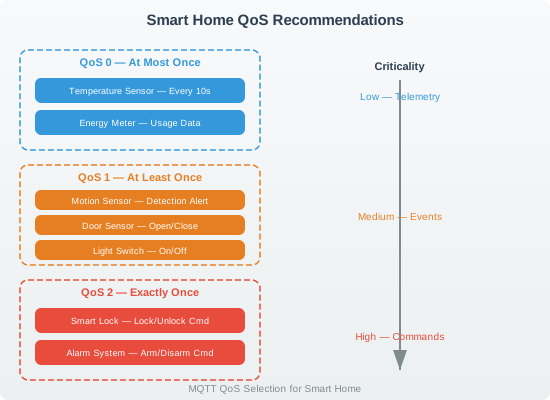
- High-frequency telemetry (temperature every 10 seconds)
- Data where occasional loss is acceptable
- Constrained devices needing minimal power consumption
- Situations where newer data supersedes older data
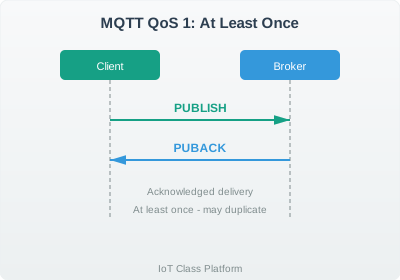
QoS 1: At Least Once
Message Flow:
Behavior:
- Message stored until PUBACK received
- Sender retries if no acknowledgment within timeout
- Guaranteed delivery but may cause duplicates
- Moderate overhead
When to Use:
- Alert messages (door opened, motion detected)
- Status changes that must be delivered
- When duplicates can be handled (idempotent operations)
- Most common choice for IoT applications
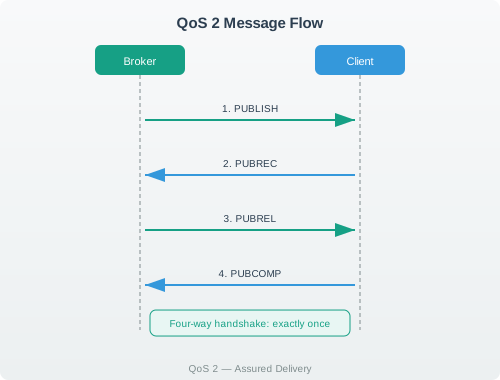
QoS 2: Exactly Once
Message Flow:
Behavior:
- Four-way handshake ensures exactly one delivery
- Message ID tracked to prevent duplicates
- Highest reliability but slowest
- Significant overhead
When to Use:
- Critical commands (unlock door, start engine)
- Financial transactions
- When duplicates would cause problems
- Low-frequency, high-importance messages
QoS Selection Guide
| Factor | QoS 0 | QoS 1 | QoS 2 |
|---|---|---|---|
| Latency | Lowest | Medium | Highest |
| Bandwidth | Lowest | Medium | Highest |
| Battery Usage | Lowest | Medium | Highest |
| Message Loss | Possible | No | No |
| Duplicates | No | Possible | No |
| Complexity | Simple | Moderate | Complex |
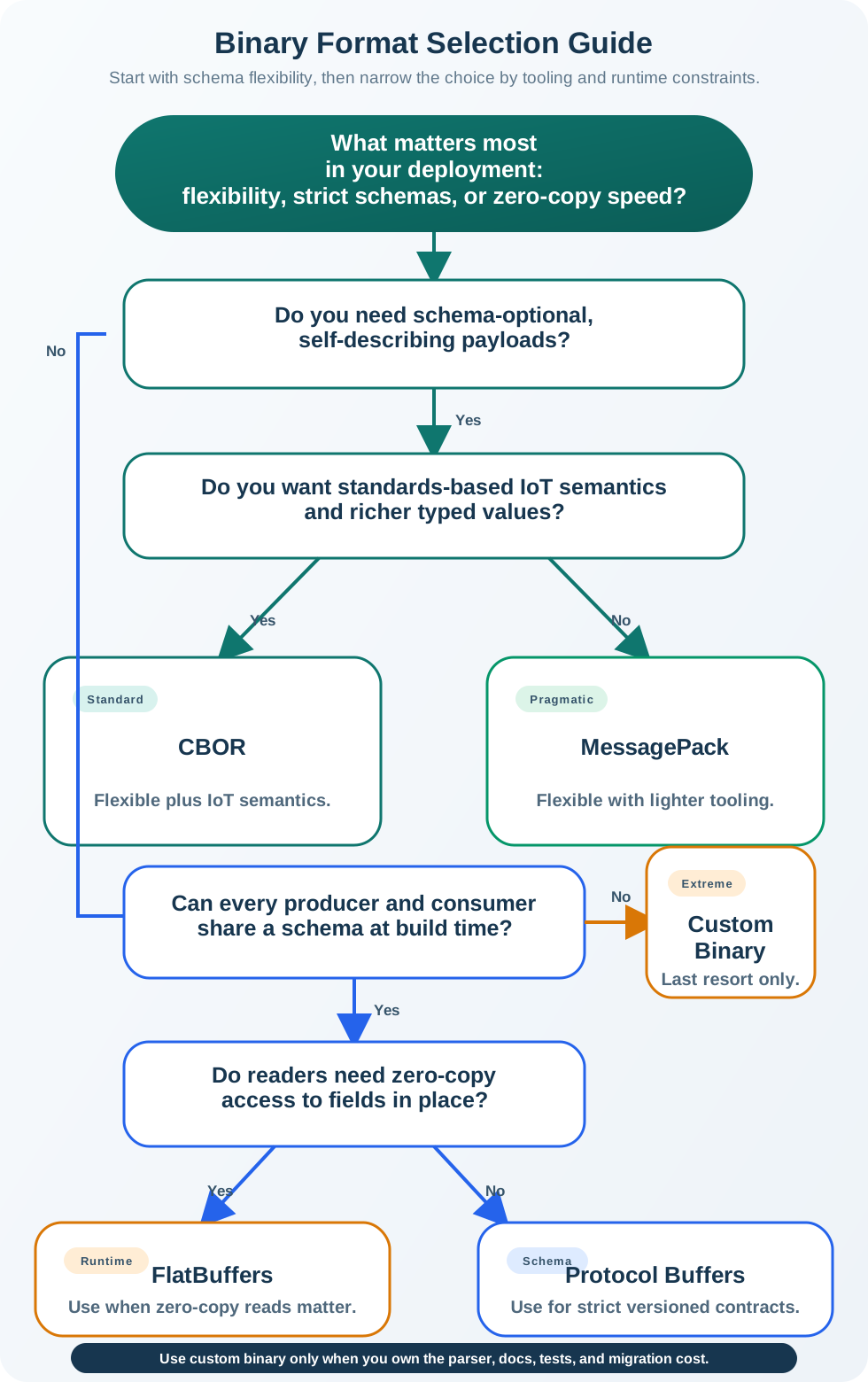
Decision Flowchart
Network Condition Effects
Packet Loss Impact
| QoS | 0% Loss | 10% Loss | 30% Loss | 50% Loss |
|---|---|---|---|---|
| QoS 0 | 100% delivered | ~90% delivered | ~70% delivered | ~50% delivered |
| QoS 1 | 100% delivered | 100% (retries) | 100% (more retries) | 100% (many retries) |
| QoS 2 | 100% delivered | 100% (retries) | 100% (more retries) | 100% (many retries) |
Latency Considerations
- QoS 0: Message latency = network latency
- QoS 1: Message latency = 2x network latency (PUBLISH + PUBACK)
- QoS 2: Message latency = 4x network latency (four-way handshake)
On satellite links (500-800ms RTT), QoS 2 can take 2-3 seconds to complete a single message delivery. Consider:
- Using QoS 1 with application-level deduplication
- Batching messages to amortize handshake overhead
- Accepting QoS 0 for non-critical telemetry
Practical Examples
Smart Home System
Industrial IoT

Common Issues and Solutions
The effective QoS is the minimum of publisher and subscriber QoS:
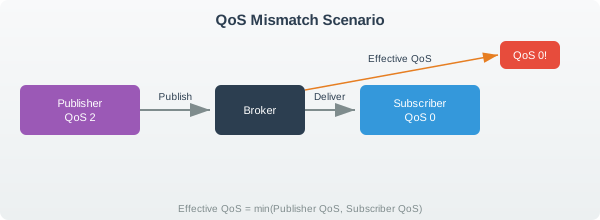
Solution: Ensure subscriber QoS matches or exceeds the required reliability level.
Duplicate Handling for QoS 1
When using QoS 1, implement idempotent message handling:
# Bad: Non-idempotent operation
def handle_message(msg):
    counter += 1  # Duplicate increments twice!

# Good: Idempotent with message tracking
processed_ids = set()

def handle_message(msg):
    if msg.id in processed_ids:
        return  # Skip duplicate
    processed_ids.add(msg.id)
    counter += 1
Session Persistence with QoS
QoS 1 and 2 messages are stored only if:
- Clean Session = false (persistent session)
- Subscriber is offline when message arrives
- Message QoS >= 1
| Component | Clean Session = true | Clean Session = false |
|---|---|---|
| Subscriptions | Cleared on disconnect | Persisted |
| Pending QoS 1/2 | Discarded | Stored for delivery |
| Message IDs | Reset | Maintained |
What’s Next
- MQTT QoS and Session - Deep dive into QoS and session management
- MQTT Fundamentals - Complete MQTT protocol overview
- Pub/Sub Flow Simulator - Visualize message routing
- MQTT Topic Designer - Design topic hierarchies
- MQTT Labs and Implementation - Hands-on coding exercises
This interactive tool is implemented in approximately 1,000 lines of Observable JavaScript. Key features:
- QoS Level Simulation: Accurate simulation of QoS 0, 1, and 2 message flows
- Network Condition Modeling: Configurable packet loss, latency, and connection drops
- Visual Flow Animation: Step-by-step handshake visualization with D3.js
- Statistics Tracking: Real-time delivery success, loss, and duplicate counts
- Comparison Mode: Side-by-side comparison of all three QoS levels
- Pre-built Scenarios: Five network condition presets for quick testing
Educational Simplifications:
- Real MQTT implementations use exponential backoff for retries
- Session persistence and message queuing not fully simulated
- Network conditions are simplified (no jitter, congestion simulation)
- Broker-side QoS downgrade not demonstrated
Color Palette (IEEE standard):
- Navy (#2C3E50): Primary UI, broker
- Teal (#16A085): QoS 0, success states
- Orange (#E67E22): QoS 1, warnings
- Purple (#9B59B6): QoS 2
- Green (#27AE60): Delivery success
- Red (#E74C3C): Failure, lost messages