Pub/Sub Flow Simulator
Interactive Visualization of MQTT Publish/Subscribe Message Routing
Pub/Sub Message Flow Simulator
This interactive tool visualizes how MQTT publish/subscribe message routing works. Add publishers and subscribers, send messages, and watch how the broker routes messages based on topic matching rules including wildcards.
The Pub/Sub (Publish/Subscribe) pattern is fundamental to MQTT and IoT messaging. This simulator allows you to:
- Manage Publishers: Add/remove publishers with specific topics
- Manage Subscribers: Add/remove subscribers with topic filters (including wildcards)
- Send Messages: Select a publisher and send messages to see routing in action
- Visualize Flow: Watch animated message paths from publisher through broker to matching subscribers
- Understand Matching: See detailed explanations of why each subscriber did or didn’t receive the message
- Add publishers: Create publishers that publish to specific topics
- Add subscribers: Create subscribers with topic filters (can use + and # wildcards)
- Select a publisher: Choose which publisher will send a message
- Enter message content: Type the message payload
- Click “Send Message”: Watch the animated message flow and see matching results
- Load pre-built scenarios: Try different configurations to understand wildcard behavior
Understanding Topic Matching
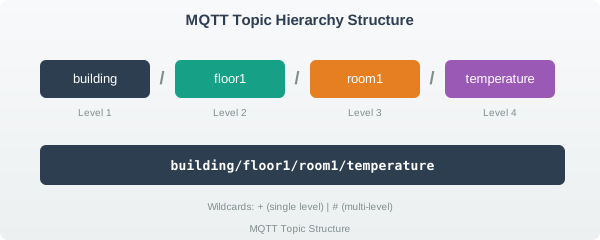
MQTT uses a hierarchical topic structure where levels are separated by forward slashes (/). Subscribers can use wildcards to match multiple topics at once.
Topic Structure
Topics follow a hierarchical naming convention:
Wildcard Types
+
The + wildcard matches exactly one topic level.
| Topic Filter | Matches | Does NOT Match |
|---|---|---|
home/+/temperature |
home/kitchen/temperature |
home/kitchen/front/temperature |
+/humidity |
office/humidity |
building/floor1/humidity |
sensors/+/+/value |
sensors/temp/1/value |
sensors/temp/value |
#
The # wildcard matches any number of levels (including zero). It must be the last character in the filter.
| Topic Filter | Matches | Does NOT Match |
|---|---|---|
home/# |
home/kitchen, home/kitchen/temp, home |
office/temp |
sensors/floor1/# |
sensors/floor1, sensors/floor1/room1/temp |
sensors/floor2/temp |
# |
Everything | Nothing |
Matching Rules Summary
| Rule | Description |
|---|---|
| Exact match | home/temp matches only home/temp |
+ substitution |
Each + must match exactly one level |
# expansion |
# matches zero or more remaining levels |
| Case sensitive | Home/Temp != home/temp |
| No partial levels | home/temp+ is invalid |
Common Patterns
Device Telemetry
devices/{device-id}/telemetry/{metric}

Examples:
- devices/sensor001/telemetry/temperature
- devices/sensor001/telemetry/humidity
- devices/gateway01/telemetry/status

Useful filters:
- devices/+/telemetry/# (all telemetry from all devices)
- devices/sensor001/telemetry/+ (all metrics from sensor001)
Command and Response
commands/{device-id}/request
commands/{device-id}/response

Filters:
- commands/+/request (all command requests)
- commands/+/response (all command responses)
Location-Based
{region}/{building}/{floor}/{room}/{device-type}

Examples:
- us-west/hq/floor3/office1/thermostat
- eu-central/warehouse/floor1/dock2/sensor

Filters:
- us-west/# (all US West devices)
- +/+/floor3/# (all floor 3 devices across all buildings)
Best Practices
- Use meaningful hierarchy: Order levels from general to specific
- Avoid leading slashes: Use
home/tempnot/home/temp - Keep topics readable: Use clear names like
temperaturenott - Plan for wildcards: Design hierarchy to support useful wildcard queries
- Limit depth: 5-7 levels is usually sufficient
- Use consistent naming: Pick a convention (camelCase, snake_case) and stick to it
Security Considerations
| Risk | Mitigation |
|---|---|
| Wildcard subscriptions expose too much data | Use ACLs to limit wildcard scope |
| Topic enumeration attacks | Don’t include sensitive data in topic names |
| Unauthorized publishing | Implement publish permissions per topic |
What’s Next
- MQTT Fundamentals - Complete MQTT protocol overview
- MQTT Pub/Sub Animation - Step-by-step message lifecycle
- MQTT QoS and Session - Quality of Service explained
- AMQP vs MQTT Comparison - Protocol selection guide
- Application Protocols - All IoT application protocols
This interactive tool is implemented in approximately 800 lines of Observable JavaScript. Key features:
- Dynamic publisher/subscriber management: Add/remove entities in real-time
- MQTT wildcard matching engine: Full support for
+and#wildcards - Animated message flow: Visual representation of publish/subscribe routing
- Match explanation panel: Detailed reasoning for each subscriber match/non-match
- Pre-built scenarios: Three configurations demonstrating different matching patterns
- Topic validation: Proper MQTT topic structure enforcement
Educational simplifications:
- Real MQTT brokers handle thousands of clients and millions of messages
- QoS levels (0, 1, 2) affect delivery guarantees (not shown here)
- Retained messages, Last Will, and session persistence not demonstrated
- Authentication and authorization (ACLs) not included
The tool uses the IEEE color palette for consistency with other course materials: - Navy (#2C3E50): Primary UI elements, broker - Teal (#16A085): Publishers - Purple (#9B59B6): Subscribers - Orange (#E67E22): Messages, warnings - Green (#27AE60): Successful matches - Red (#E74C3C): Failed matches