Goodnight Scene Confirmation Evidence
Goodnight Scene Confirmation Evidence
Try Choose Step to follow the Z-Wave command from the smart hub to the door lock and check its outcome field.
Goodnight has been accepted. The preview shows the intended actions, and the outcome column is waiting for evidence.
Smart Hub · Scene Controller
Goodnight run · Hub request accepted
Support view · Goodnight run
- Dispatch event · Command sent
Smart Hub → Door Lock · Z-Wave · Goodnight run - Outcome report · Missing at deadline
Door Lock · Goodnight run - Physical lock state · Unknown
No fresh lock-state report for this run.
Lights · All OFF
Zigbee / Hub- Outcome report
- Awaiting result
- Observed state
- Awaiting evidence
Door Lock · LOCKED
Z-Wave Hub → Door Lock- Dispatch
- Awaiting evidence
- Outcome report
- Awaiting result
- Physical lock state
- Unknown
Thermostat · Set 65 °F
Wi-Fi- Outcome report
- Awaiting result
- Observed state
- Awaiting evidence
TV · Power OFF
Smart Plug- Outcome report
- Awaiting result
- Observed state
- Awaiting evidence
Phone · Alarm Set
Cloud API- Outcome report
- Awaiting result
- Observed state
- Awaiting evidence
Figure 3 · Goodnight scene
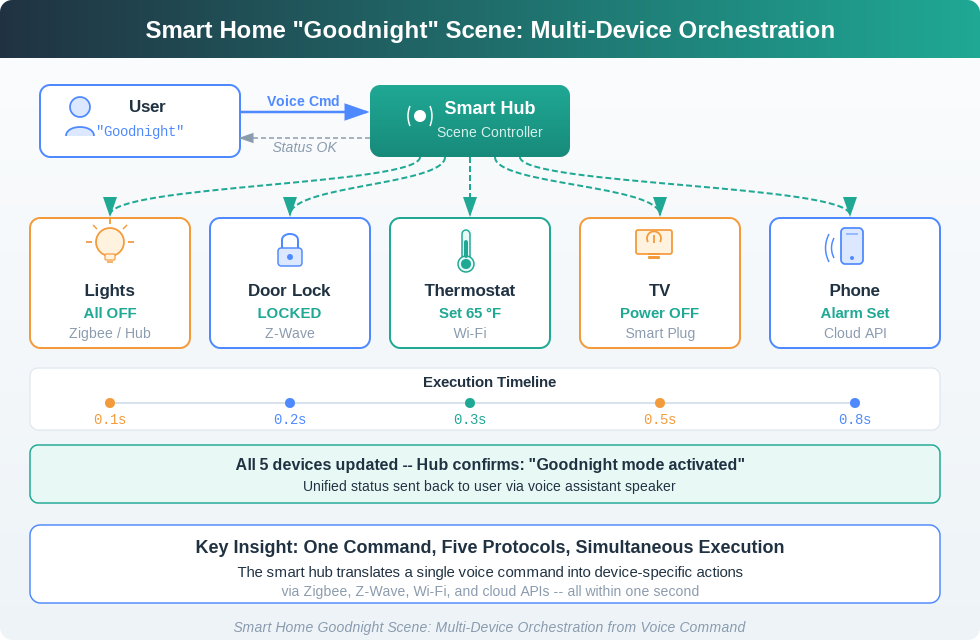
Successful reference path
Hub confirms “Goodnight mode activated”.
Observe By Frame 3, the thermostat reports a 65 °F setpoint and the lights, TV and phone show matching reports, while the lock outcome still awaits confirmation.
Explain The hub reports partial confirmation in Frame 4 because the deadline passes without a fresh lock-state report, even though the command was sent and the other endpoint reports match.
Technical boundaries. The replay follows a single Goodnight run with a product-defined reporting deadline whose duration is unspecified. The support view records dispatch and the missing report while leaving the physical lock state unknown. The reference figure shows the successful path.